
OpinionX Product Changelog
The latest news about OpinionX product updates. Check out our knowledge base for product documentation and tutorial guides.
Workspace Whitelabelling and Custom Survey Subdomains (August 2026 Updates)
OpinionX now has an expanded range of custom branding option -- including custom survey domains and workspace default settings for things like survey theme, finish page, and footer components.
1. Workspace Whitelabelling
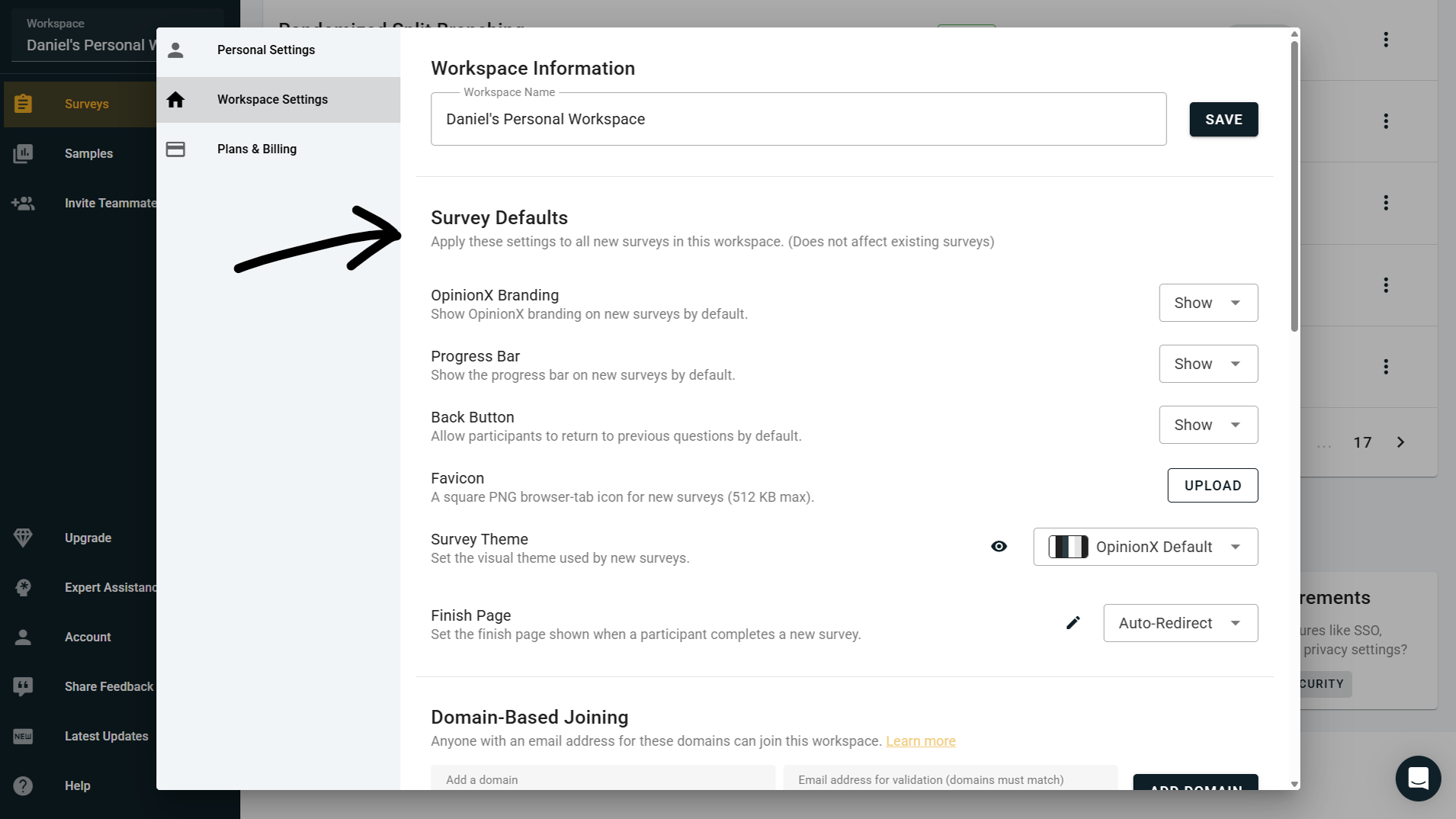
OpinionX customers on the Accelerate tier can now set workspace-wide defaults that apply to every new survey created inside their workspace. This makes it much easier to keep your surveys consistently branded without having to manually configure every setting each time you spin up a new one.
Here's everything you can now set as a workspace-wide default:
Custom Favicon → Upload your own favicon that will appear in the browser tab whenever a survey participant is taking one of your surveys.
Default Custom Theme → Set your workspace's default color scheme, fonts, and background so that every new survey inherits your brand's look and feel automatically.
Default Finish Page → Set a default finish page or redirect link that all newly created surveys will use once a participant completes the survey.
Progress Bar Visibility → Show or hide the survey progress bar by default across all newly created surveys.
Back Button Visibility → Show or hide the participant Back button by default. Useful if you want to prevent respondents from reviewing or changing earlier answers, particularly on research studies where order effects or first-instinct answers matter for data quality.
'Powered by OpinionX' Visibility→ Show or hide the Powered by OpinionX button that appears in the footer of survey participation pages by default.
All of these are workspace-level defaults rather than locked settings, so you can still override any of them on individual surveys where you need something different. This is especially useful for teams running lots of surveys where consistency matters — client-facing research agencies, in-house research teams at larger companies, product teams running recurring pricing or feedback studies, that sort of thing.
2. Custom Subdomains (Enterprise add-on)
For customers who want to take whitelabelling all the way, we can now also set up an entirely custom subdomain for your survey participation links, eg. surveys.yourdomain.com. This means your participants only ever interact with your branded link, not with opinionx.co at any point during the voting experience.
Your OpinionX dashboard for building surveys and analyzing results still lives at app.opinionx.co — this is just about what participants see when they open your survey link. Setup involves adding a CNAME record on your domain pointing to OpinionX, which we'll walk you through when you get in touch.
Custom subdomains are not included in the Accelerate tier and aren't self-serve in the workspace settings — this is a premium add-on for enterprise customers, configured directly by our team. If you're an enterprise customer and this sounds useful, reach out to your dedicated account manager and they'll get it set up for you. If you're not on an enterprise plan yet but want to explore this, book a call and we'll walk you through what's involved.
3. Other Updates
There were a couple of other changes included in this batch of July 2026 updates:
Dynamic Page Titles → Your browser tab now shows a customized page title based on your current screen (eg. the name of the survey you're editing, or the results tab you're viewing) rather than just "OpinionX" on every tab. This makes it much easier to navigate when you have several OpinionX tabs open at once, which is pretty common for anyone running multiple surveys or comparing results across studies.
Gabor Granger Vote Count Preview → The Gabor Granger survey setup screen now displays the exact maximum number of votes a participant may need to cast during the Gabor Granger section of your survey, updated live as you change the number of prices. Because Gabor Granger on OpinionX uses binary search to pick each subsequent price, this number stays surprisingly low even for large price ranges (a survey with 40 prices only needs 6 votes per participant, for example) — so this preview helps researchers see exactly how efficient their setup is before launching.
Gabor Granger Pricing Surveys on OpinionX (July 2026 Updates)
We’re expanding our range of pricing study methods available as part of our mission to make OpinionX the number one tool for in-house researchers to run advanced market research methods without needing any specialists to help them! The latest update includes a purpose-built Gabor Granger question type along with a bunch of additional platform fixes and improvements.

1. Gabor Granger Pricing Surveys
We've added Gabor Granger to the list of pricing research methods available on OpinionX! You'll find it under the Advanced section of the question type menu, alongside Conjoint Analysis, MaxDiff Analysis, and Van Westendorp (which we launched just two weeks ago).
Gabor Granger is a willingness-to-pay research method that helps you find the specific price that maximizes revenue for your product. Instead of asking respondents to name a price (which they're bad at, since they'll strategically lowball or pluck a round number out of thin air), Gabor Granger shows each participant a specific price and asks a simple yes/no: would you buy at this price? Then it does it again at a different price in the direction they indicated. From those yes/no answers, OpinionX automatically builds a picture of exactly how much of your market is willing to pay at every price point you tested.
It's a great fit when you already have a rough sense of your pricing range and want to find the specific number inside that range that maximizes revenue. It’s a flexible research method that works for one-time purchases and subscriptions alike, products and services, and more.
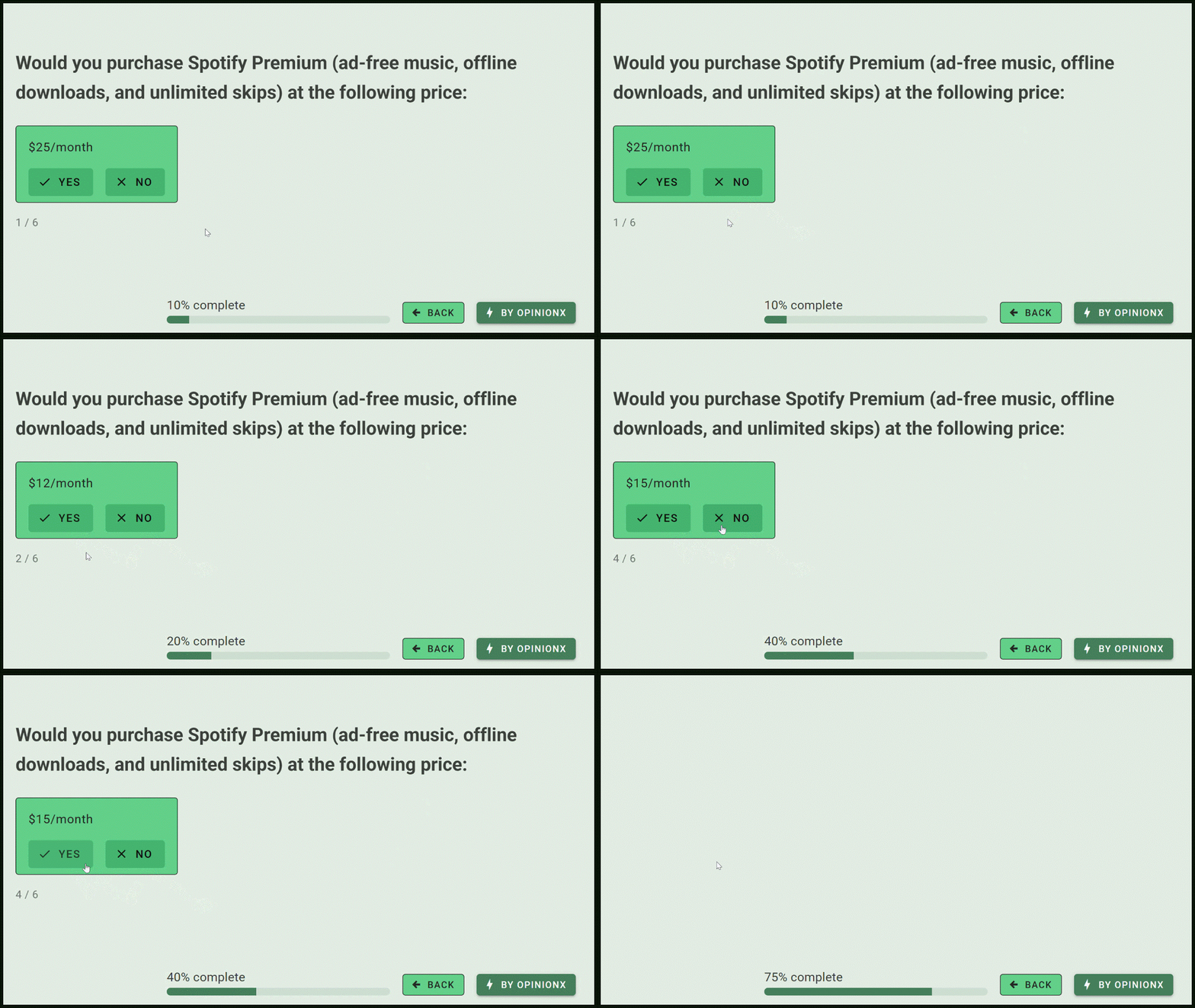
Screen recording of the participant voting experience on a Gabor Granger survey hosted on OpinionX
The most efficient Gabor Granger tool on the internet
Every other survey tool that offers Gabor Granger uses either sequential ordering (go up one price point after a 'yes' vote, down one price point after a 'no' vote) or randomized ordering (jump to a random price within the remaining range) to decide which price to show a participant next. Both of these are very inefficient: a participant might need to answer 15+ questions just to identify their willingness to pay.
OpinionX uses a smart, efficient approach instead called binary search. After each vote, we send the participant to the midpoint of their remaining possible prices, cutting the search space in half every time. That means:
A Gabor Granger survey with 15 potential prices resolves in a maximum of 5 questions per participant.
A survey with 100 potential prices results up to just 8 votes at most per participant.
A survey with 1,000 potential prices results up to just 11 votes at most per participant.
The math is logarithmic, which is the technical way of saying "you can test way more prices without burning through respondents' patience." This is just one of the many ways we’ve paid extra attention to detail when building this Gabor Granger question type. On many survey platforms, Gabor Granger is just a templated mess of branching logic between a bunch of separate question blocks. On OpinionX, we’ve put everything neatly inside a purpose-built method, automated in every way possible, made extra efficient, and optimized for mobile and touchscreen respondents.
These details make OpinionX the most efficient and smoothest Gabor Granger tool available on the internet, helping you get more precise pricing data with fewer questions per participant. And the best part is that Gabor Granger surveys are available on OpinionX’s free plan!
Middle-third randomized starting price
The first price a person sees in a Gabor Granger survey acts as an anchor that colors every answer after it, so if everyone starts at the same price, anchoring bias is baked uniformly into your results with no way to detect or correct it.
OpinionX uses a different approach, where the first price each participant sees is drawn randomly from the middle third of your price range. By spreading the starting price across a range of values, anchoring noise averages out across your sample instead of shifting your whole demand curve in one direction. This 'middle third' setting is always on and there's no toggle to disable it, because it makes your data meaningfully more reliable at zero cost to the participant experience.
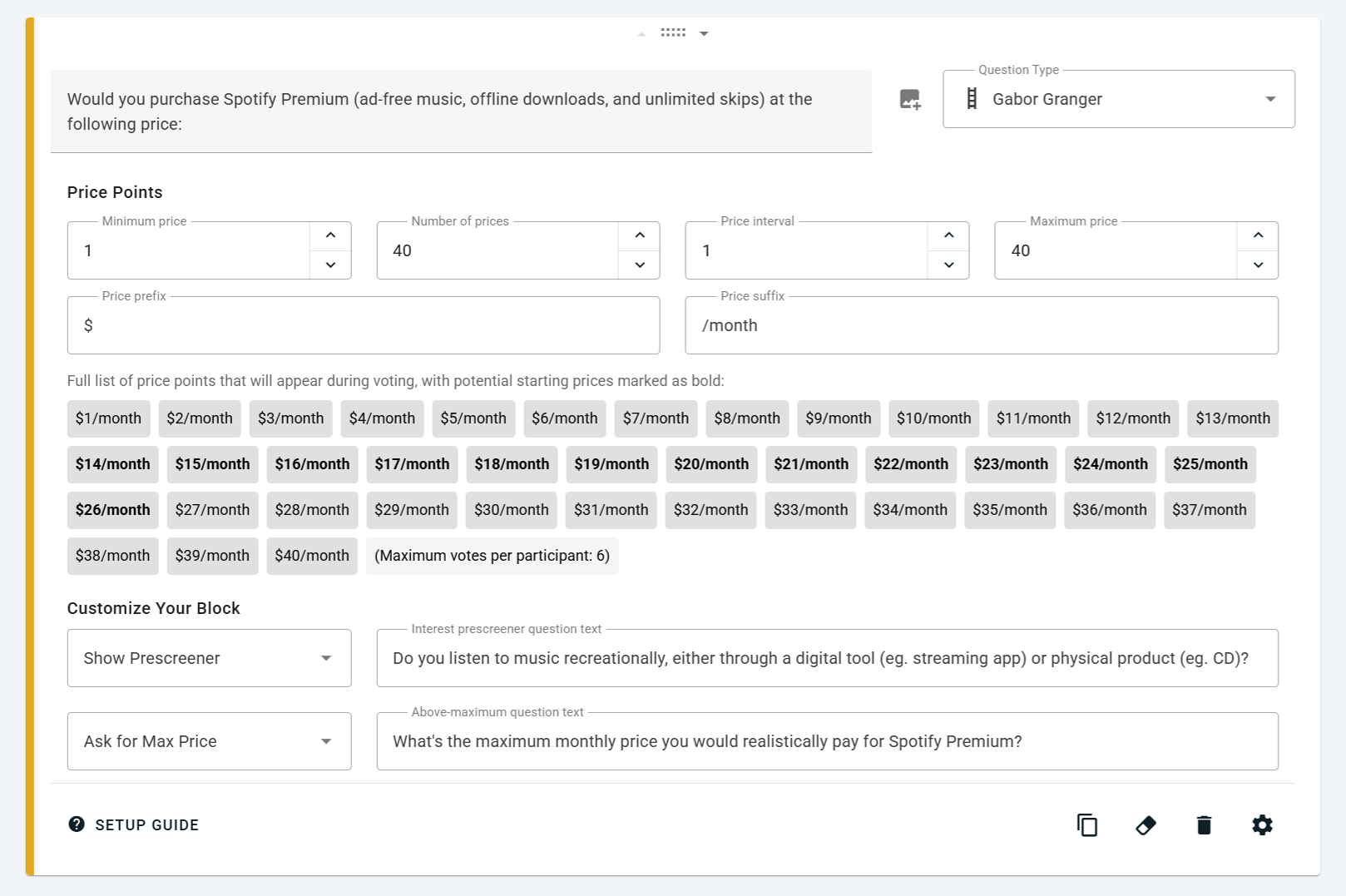
Screenshot of OpinionX’s survey setup screen when configuring a Gabor Granger survey
The Optimal Price chart
Every Gabor Granger survey produces one main chart on the results dashboard, showing two lines:
Demand (blue, right axis, %) → the share of your market willing to buy your offering at each price point.
Average revenue per target customer (orange, left axis, currency) → price × demand at each price, averaged across all survey respondents.
The 'average revenue' line is typically a bump-shaped curve. The top of the bump shows you the key insight from a Gabor Granger survey — the Optimal Price which produces the most revenue overall.
Above the chart, you'll see four boxes that summarize your results:
Optimal Price → The price at the peak of the average revenue curve.
Not Interested → The percentage of participants who opted out via the interest prescreener at the start of the Gabor Granger section.
All Rejected → The percentage who said 'no' to every price they were offered, including the minimum price you chose.
No Ceiling → The percentage who said 'yes' to every price, including the highest option.

Segmentation and comparison
Gabor Granger works with OpinionX's full segmentation analysis engine — you can filter your results, compare two groups side by side using the Compare Tab, or generate a crosstab of loads of segments using the Segments Tab to spot which customer types will pay way more or much less than everyone else.
For a full walkthrough of everything covered above, including setup instructions and analysis tips, check out our Gabor Granger knowledge base article. If you're looking for a beginner's guide to the Gabor Granger method itself, we've also written a guide to Gabor Granger for pricing research on our blog.
👆 Try it for yourself! Vote in the embedded Gabor Granger sample survey above and then see the interactive results page afterwards :)
— — —
2. Other Updates
There were a bunch of other changes included in this second batch of July 2026 updates:
Hide Back Button → New toggle on your survey settings page that hides the 'Back' button from participants across your entire survey. Useful when you want to prevent respondents from reviewing or changing earlier answers, particularly on research studies where order effects, first-instinct answers matter for data quality, or advanced branching logic exposes sensitive routes through the survey when people retreat and revote.
Van Westendorp Auto-Translation → OpinionX's multi-language auto-translate feature now covers the price prefix and price suffix text on Van Westendorp blocks too, so if you're running a Van Westendorp survey in multiple languages, currency symbols and unit labels like per month or /seat translate alongside your question text automatically.
Van Westendorp Branching → You can now configure conditional branching logic on OpinionX using Van Westendorp answers, including conditions like "greater than or equal to [price] for [Q1-4 of the VW block]". This means you can route participants to different follow-up questions based on how price-sensitive their Van Westendorp answers show them to be — for example, sending everyone with a Costly answer above $50 to a specific product comparison question, or excluding participants whose Marginal Cheapness is above your Optimal Price.
Conjoint Empty State → We've updated the prefilled text when a Conjoint Analysis block is added to your survey so that the setup is clearer, especially for new users who are running their first conjoint study.
MaxDiff Simulator Preview Image → Added a preview image of the MaxDiff Scenario Simulator to the MaxDiff 'Change Chart Type' modal, so you can see what the simulator looks like before switching to it.
MaxDiff Simulator Sample Size → Moved the sample size count on the MaxDiff simulator into a column header position, making it easier to see how many participants each simulated scenario is drawing from at a glance.
{Block} Templates → Renamed the 'Design Inspiration' component that shows one-click templates on the empty-state version of every survey block to '{Block Name} Templates' to make the feature's purpose more obvious for users setting up a new block for the first time.
Random Split Component Width → Fixed formatting issues on the Random Split component in branching logic that were affecting users on smaller screens.
Cancellation Email for Workspace Admins → We now automatically email all workspace admins to let them know when their workspace subscription renewal is changed to 'cancelled', so no one gets caught out by an unexpected end of billing.
New question type on OpinionX: Van Westendorp pricing surveys 🎯
You can now run Van Westendorp Price Sensitivity Meter (PSM) surveys directly on OpinionX. This market research method is very popular for pricing studies, where it is used to measure willingness to pay, find your optimal price, forecast how demand changes at different price points, and identify a revenue-maximizing price point for your product.
This isn’t just a template or patchwork of custom scripting and CSS — we’ve designed a purpose-built question type, optimized for mobile survey respondents, with automated charts instantly available, and plugged into OpinionX’s segmentation and analysis engines. And it’s free to everyone on OpinionX’s free tier, with no premium trial, sales call, or credit card required.
We’ve really sweated the details on this, putting in extra effort to ensure that OpinionX is the best survey platform for running Van Westendorp pricing studies with this new update!
On your survey setup page, you’ll now see Van Westendorp as a new question type listed under the ‘Advanced’ section:

It comes prefilled with the four main Van Westendorp prompts, which you can customize as preferred. Simply add information about your product/service offering, choose your pricing details (currency symbol and any suffix like ‘per month’), and you’re ready to go.
Unlike other survey tools that treat Van Westendorp as a ‘special’ study format that can’t be paired with other market research methods, OpinionX gives you full flexibility to build the survey you want. Create one survey with multiple Van Westendorp sections, add other advanced methods like Conjoint or MaxDiff Analysis, include advanced branching logic — it’s all fully under your control!
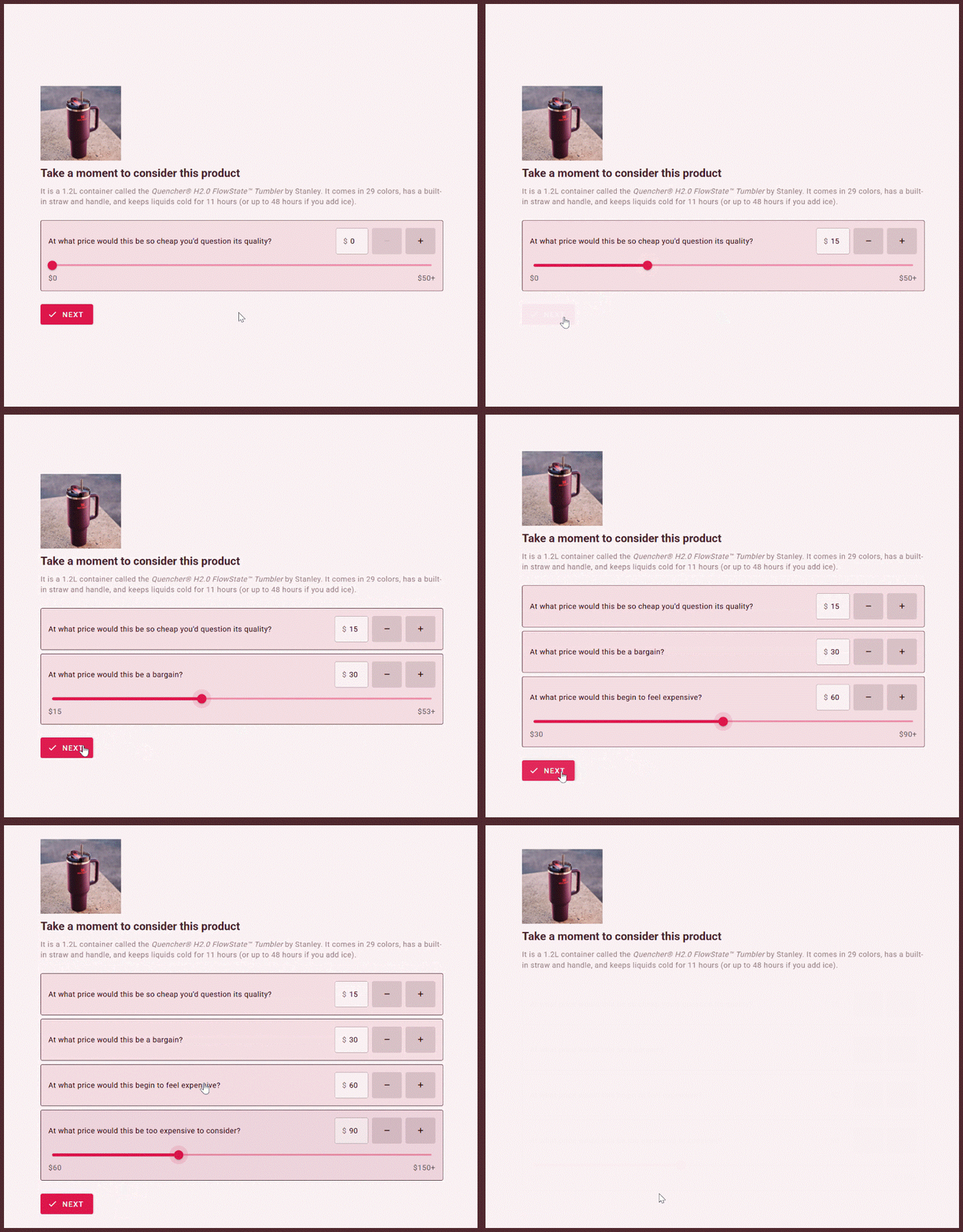
Participants get a range of easy input options when voting (a smart slider, editable number field, and handy +/- buttons), after each answer the next prompt appears sequentially, and OpinionX prevents illogical answers that contradict the order of questions. Like I said, we focused on the details to ensure your project goes as smooth as possible:
Want to try it yourself? Give the example survey below a test run, it’s an interactive embedded survey from OpinionX:
👆 Interactive example 👆
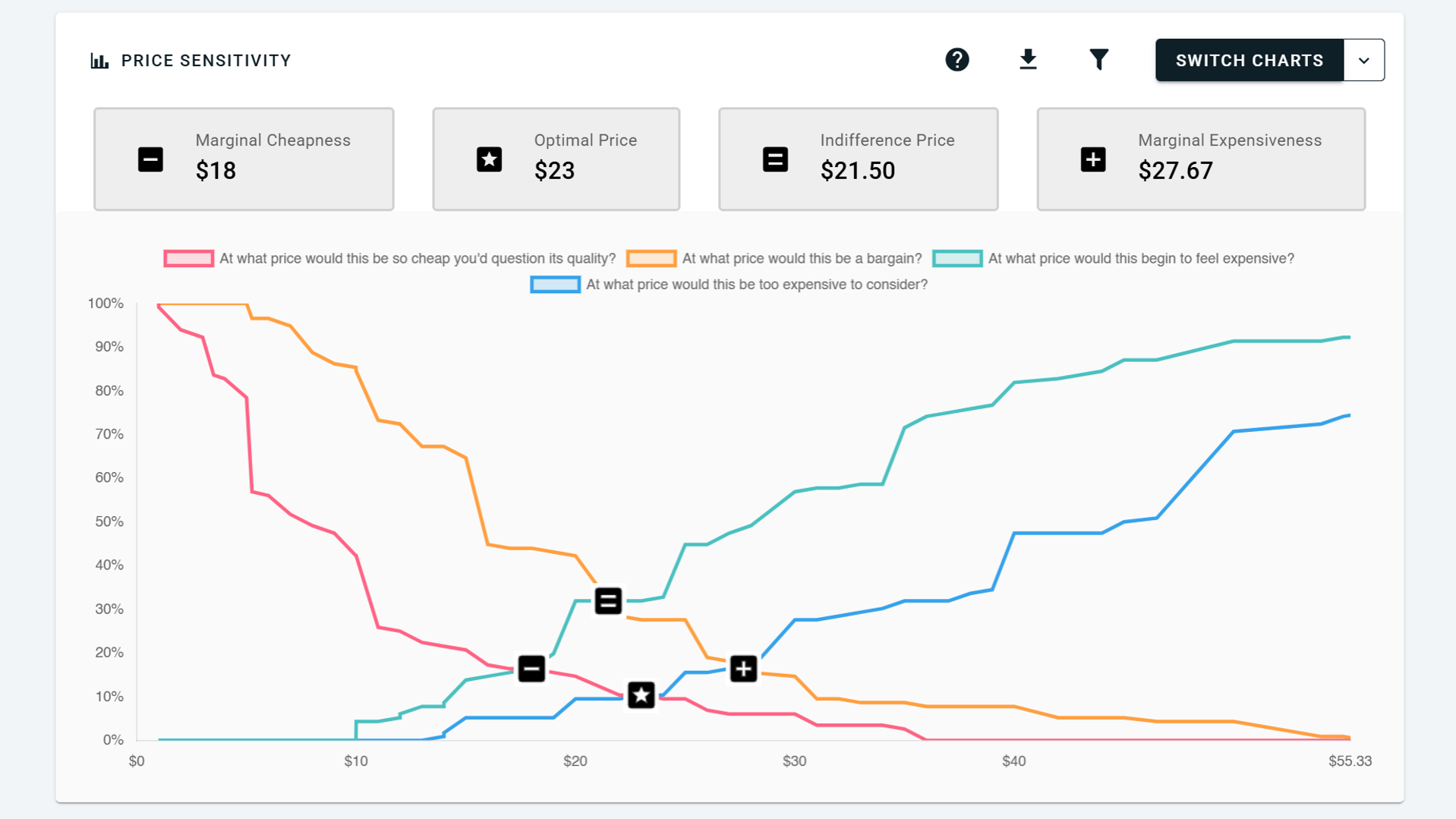
Once participants answer, you’ll automatically get a full Van Westendorp Price Sensitivity chart in your OpinionX results dashboard — complete with callouts for the main highlights like Optimal Price:
We even took this project a step further and added the Newton-Miller-Smith extension for calculating price elasticity, predicted demand, and revenue-maximizing price. On the setup tab, enable the checkbox for “Show price elasticity questions” and your Van Westendorp will add two extra follow-ups asking participants how likely they would be to actually buy the product at two of the prices they chose in the survey.
Those two extra NMS questions add another chart to your results dashboard, this time a Purchase Likelihood & Revenue chart:

All of this feeds into OpinionX’s broader segmentation analysis engine. You can use other survey answers or external enrichment data to filter your Van Westendorp charts to look at specific customer segments, or put a bunch of segments into one crosstab to see who has the highest and lowest willingness to pay:

In the example above, you can see that people who commute by bike have the highest willingness to pay for the Stanley Cup ($26 optimal price), while people who commute by public transport had the lowest willingness to pay ($15 optimal price)
What you can do with OpinionX’s new Van Westendorp survey format
In summary:
Ask the four Van Westendorp questions (too cheap, bargain, costly, too expensive) with smart expanding sliders, so respondents are never capped at a maximum price or able to give contradictory answers.
Get your key price points automatically on the Price Sensitivity chart — Marginal Cheapness, Optimal Price Point (OPP), Indifference Price Point (IPP), Marginal Expensiveness, and your overall range of acceptable prices.
Forecast demand and revenue by enabling the optional Newton-Miller-Smith (NMS) extension, which adds purchase-intent questions and unlocks the Purchase Likelihood & Revenue chart to find your revenue-maximizing price.
Test pricing for products, services, subscriptions, and one-off purchases in any currency and with any mix of target customers, using OpinionX’s filtering, segmentation, and crosstabs afterwards to compare different persona.
— — —
📖 Full setup & analysis guide: Van Westendorp Surveys on OpinionX →
🧠 New to the method? Read our intro guide: Van Westendorp for Pricing Research, Explained →
MaxDiff Simulators, Randomized Split Branching, Better Participant Limits (July 2026 Updates)
Hellooooo!
I’m excited to share the first of three big updates coming to OpinionX this month, July 2026 :)

1. Preference Simulator for MaxDiff Analysis
MaxDiff Analysis has a new chart type on OpinionX → Scenario Simulator.
You can now run a preference simulator against your maxdiff survey results, allowing you to create a mini comparison set and see the percentage of your participants who would choose each option within that set. Once you have chosen your comparison set, OpinionX checks each participant’s personal votes to see which option they would most likely choose, and then aggregates all of those individual results together to produce a population-level result of easy-to-understand percentages.
This new chart makes OpinionX’s maxdiff method even more actionable and practical for teams, especially considering it is completely automated and available to all users, including those on the free tier.
You can find the MaxDiff Scenario Simulator by clicking the ‘Switch Charts’ button on the maxdiff results block when you’re on the Results Overview tab.
2. Randomized Split Branching
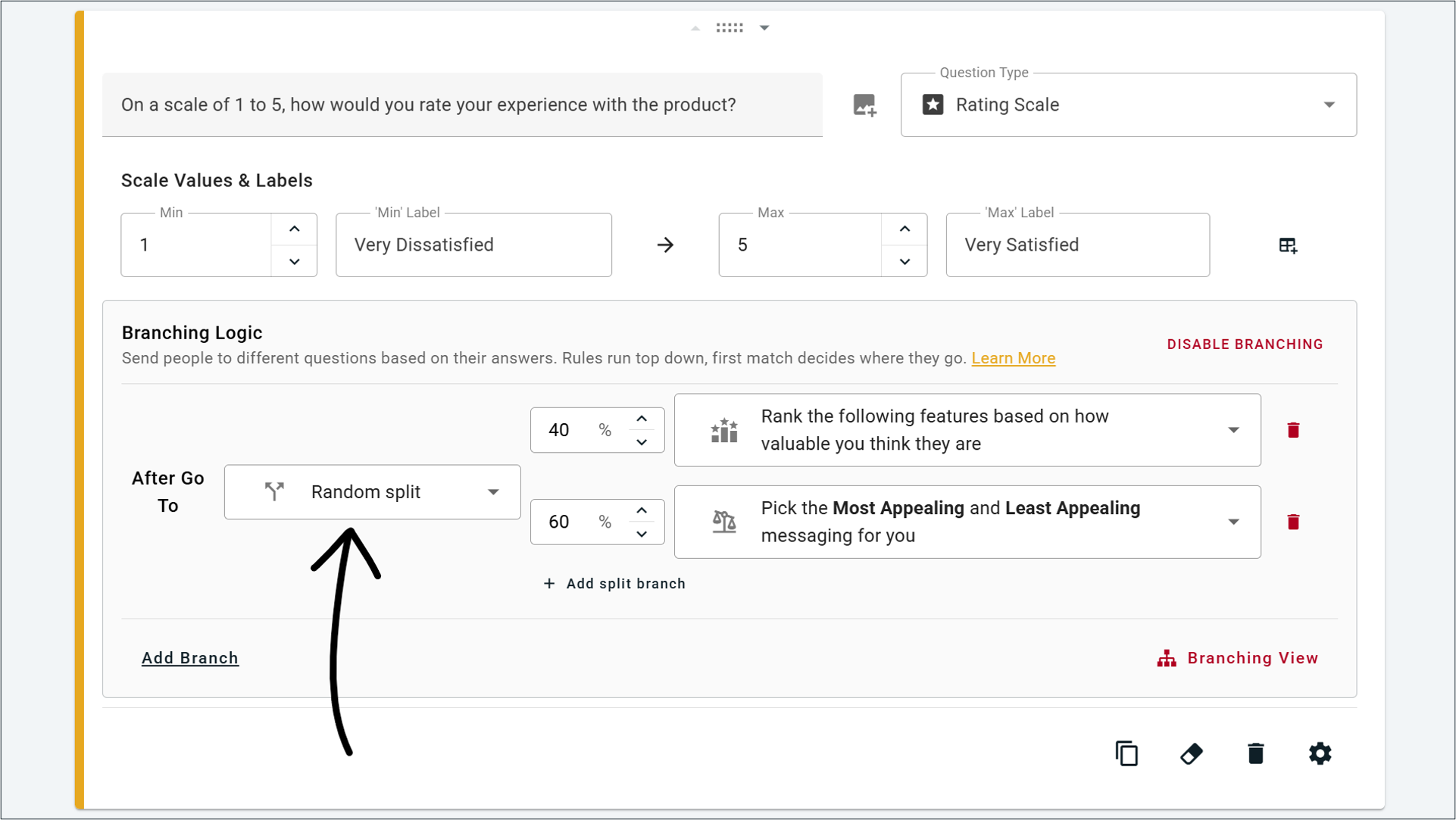
OpinionX customers have been asking for this feature to be added for a long time, so I’m relieved to finally be sharing it with you → Randomized Branching!
When setting up branching logic, you’ll find a new option named ‘Random Split.’ When you choose this option, you can create multiple different destinations and choose a percentage chance for participants to be sent down each one. You can keep that chance even across all branches, or weight it towards a specific option.
This new ‘random split’ option can even work alongside OpinionX’s existing branching logic, so you can choose whether it applies to everyone (like in my screenshot above) or only include participants who meet specific criteria, like in the example below:
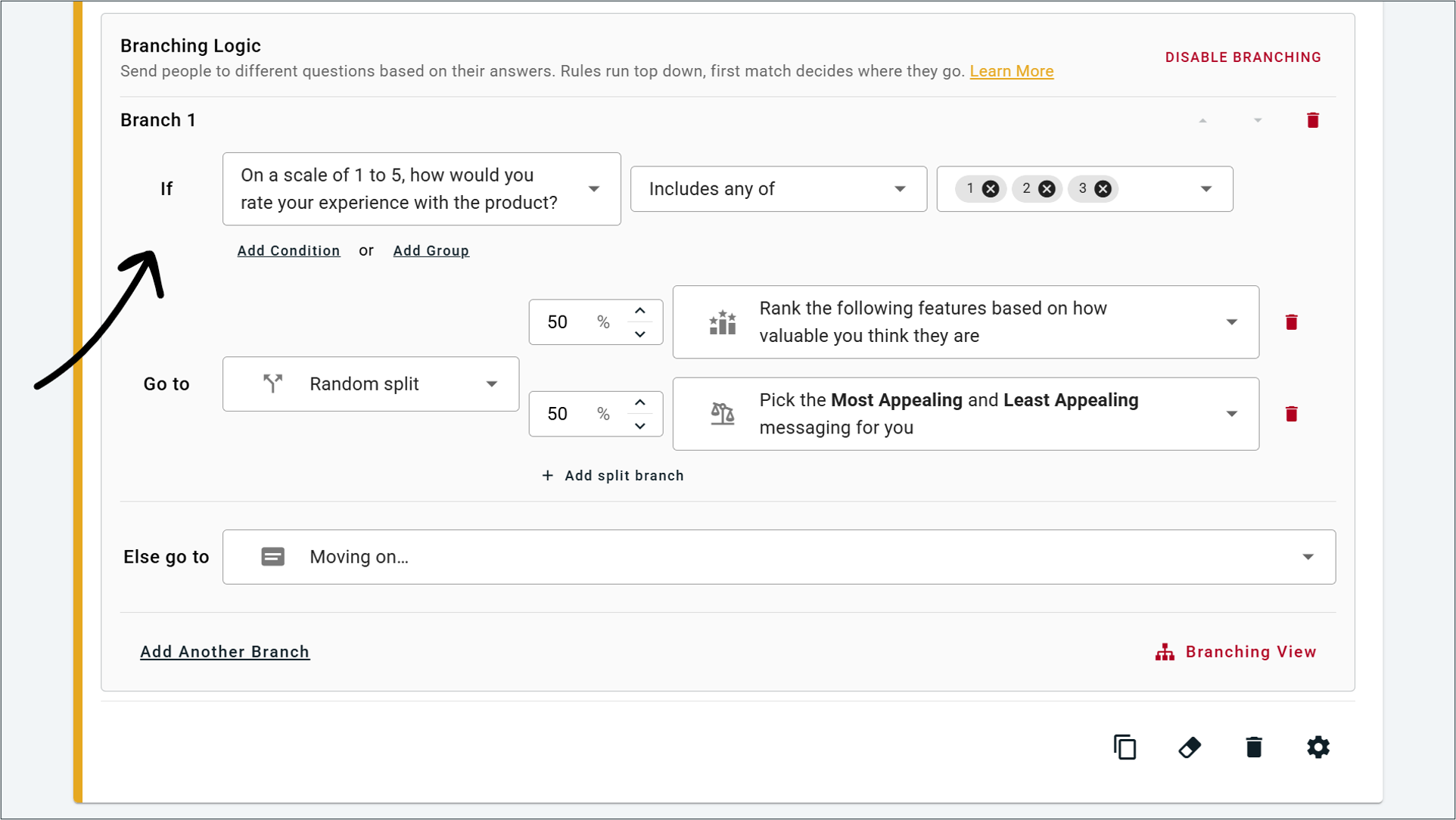
^ Example of conditional branching logic that results in randomized splits, otherwise all participants who don’t meet the conditions are routed past the two randomized blocks and sent to the next section of the survey.
3. Other Updates
There were a bunch of other changes included in this first batch of July 2026 updates:
Increased Participant Limits → The participant limit on our free tier has been increased to 25 participants per survey, giving you more room to fully test whether OpinionX meets your needs and allowing small projects to fit into our free version. Additionally, surveys on the Analyze tier can now engage unlimited participants!
Number Response Segmentation → You can now use participants’ answers to Number Response survey blocks when segmenting your results, giving you even more flexibility to slice and dice your survey results in whatever way you need!
Auto-Scroll to ‘Next’ → When participants complete questions with ranking/voting limits, such as a list of 20 options where they are asked to only rank their 3 favourites, the survey will automatically scroll down to the ‘next’ button so that it is clearer they are ready to proceed.
Advanced Block Types → We’ve separated out Conjoint Analysis and MaxDiff Analysis into their own section on the block selection menu titled ‘Advanced’. This section will contain all market research methods on OpinionX, including the upcoming additions of Van Westendorp and Gabor Granger survey methods.
Additional minor changes → Rating scale label setup has been cleaned up, we fixed a confusing label on Matrix Grid setup, we polished the design on our new branching logic interface, improved how results caching works, added increased security and verification to how users are identified on our customer support chat, and more :)
Conditional Branching Logic on OpinionX Surveys, updated (June 2026)
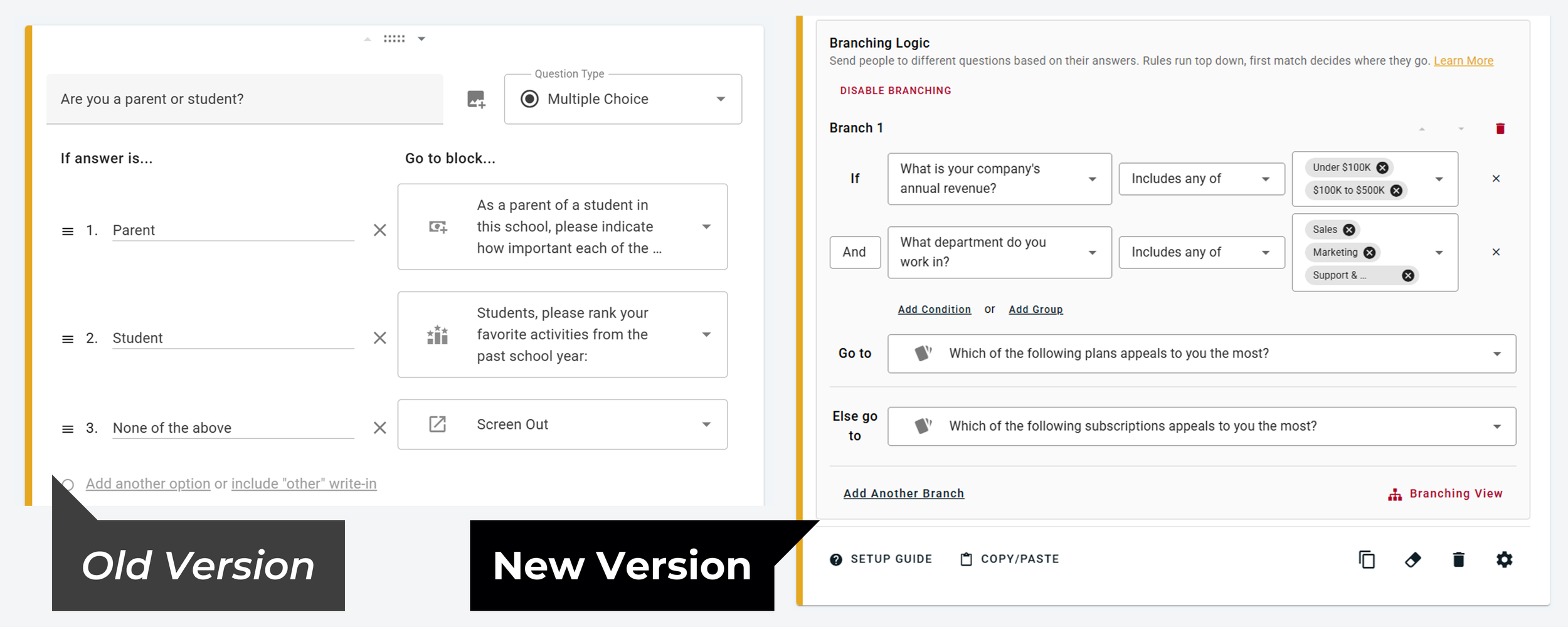
Branching Logic just got its biggest upgrade yet. We've rebuilt it from a simple "send participants somewhere based on their last answer" feature into a full conditional logic engine that can route participants based on anything they've told you, anywhere across your survey.
Here's everything that's new 👇👇👇
1. Branch on answers from any previous question
Previously, branching could only react to the question a participant had just answered. You had to split people the moment they responded, and you couldn't reach back and reference their earlier answers later in the flow. Now you can build branching rules off of any previous question in your survey. Ask about company size on the first page and route people accordingly five pages later.
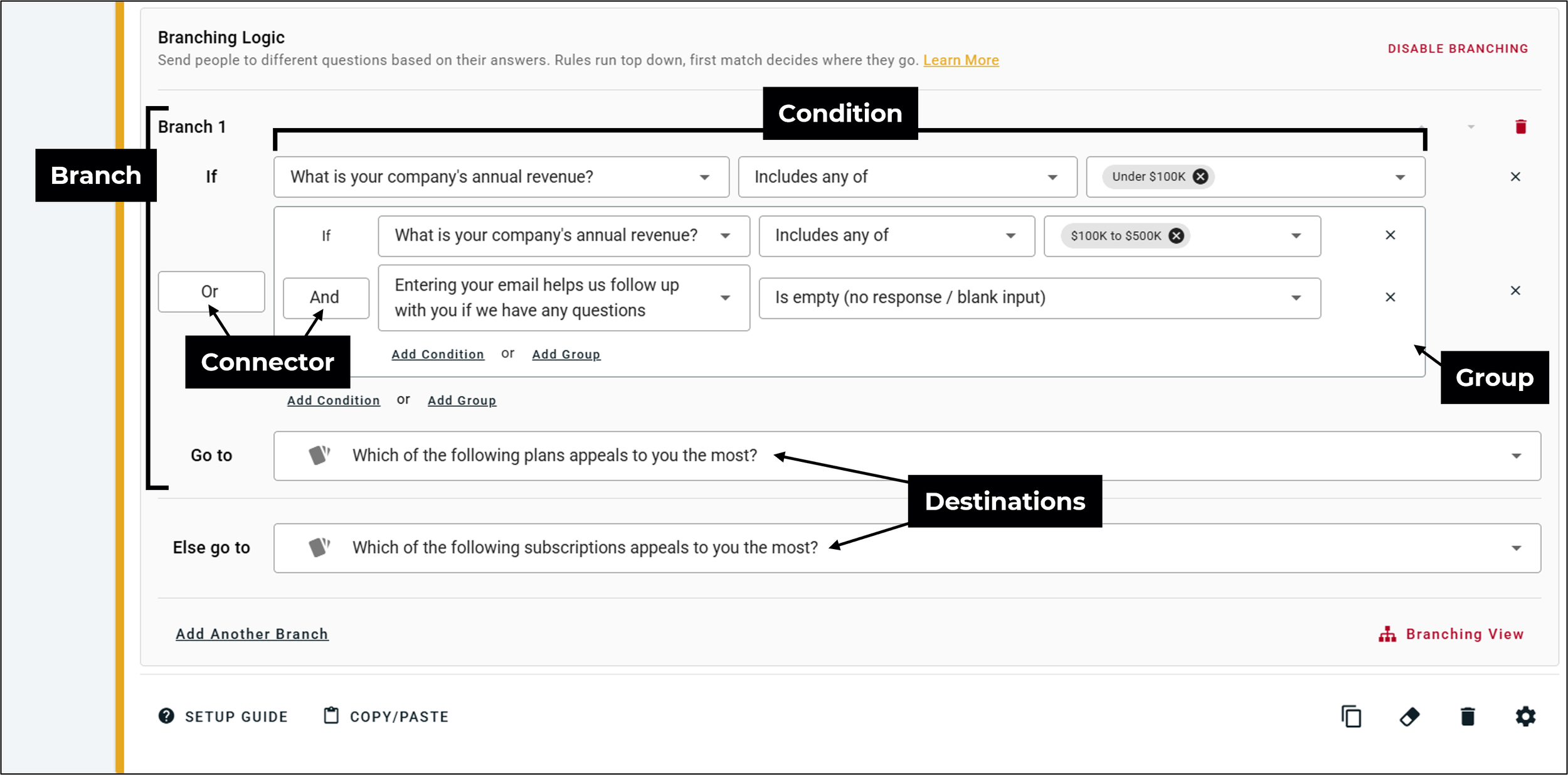
2. Combine multiple conditions with AND/OR logic
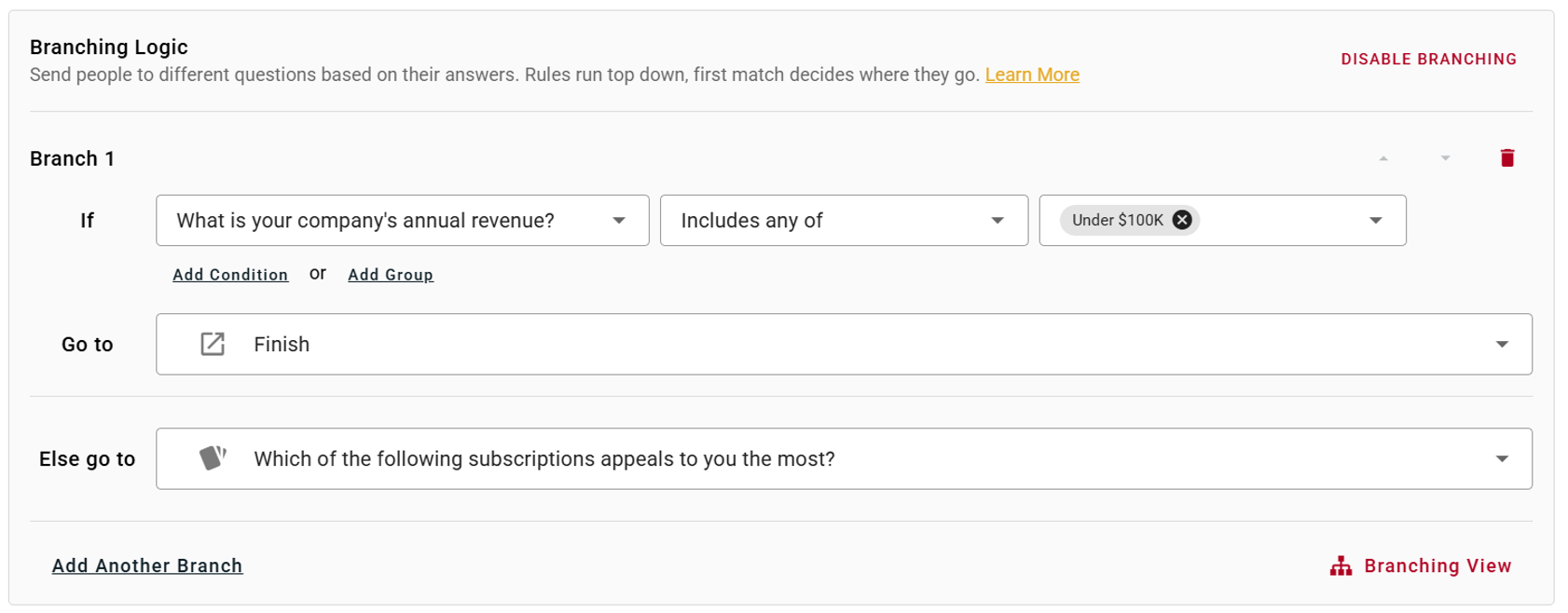
Branches are no longer limited to a single data point. You can now group multiple conditions together to define exactly who goes where. For example, send someone down a specific path only if they work in Sales and their company's annual revenue is under $500K. Stack as many conditions as you need and combine them with AND/OR logic and nested groups for extra-specific logic combos.
3. New operators for finer control
Alongside simple matching, you can now fine-tune precisely which participants meet a rule using operators like includes any of, includes all of, is empty, is not empty, does not contain, was skipped, and more.
4. Branching now works across far more question types
Branching used to be limited to Multiple Choice and Rating Scale questions only. Now you can branch on a much wider range of blocks. For example, route people based on whether an Email Identifier contains a particular value, or whether a question was skipped, is empty, or is not empty.
5. Multi-choice questions (checkboxes) are now supported for branching
Branching logic on OpinionX now works with the “Pick Many” configuration on Multiple Choice questions, which wasn't possible under the old system that only supported the "Pick One" format and simple 1:1 branches.
6. See the full picture with Branching View
Complex surveys can get hard to follow. The new Branching View gives you a visual map of every branch and rule in your survey, so you can see exactly how participants flow through it from start to finish. Click any node to jump straight to that step.

Summary: Branching has gone from a one-step, single-answer tool into a flexible logic system you can layer across your entire survey, along with a visual map to keep it all manageable. And best of all, this new functionality is available today to all OpinionX users on every plan.
— — —
Team Folders on OpinionX Workspaces
You can now create folders to organize your surveys, control who has access to each folder, and manage dedicated team spaces within your OpinionX workspace.
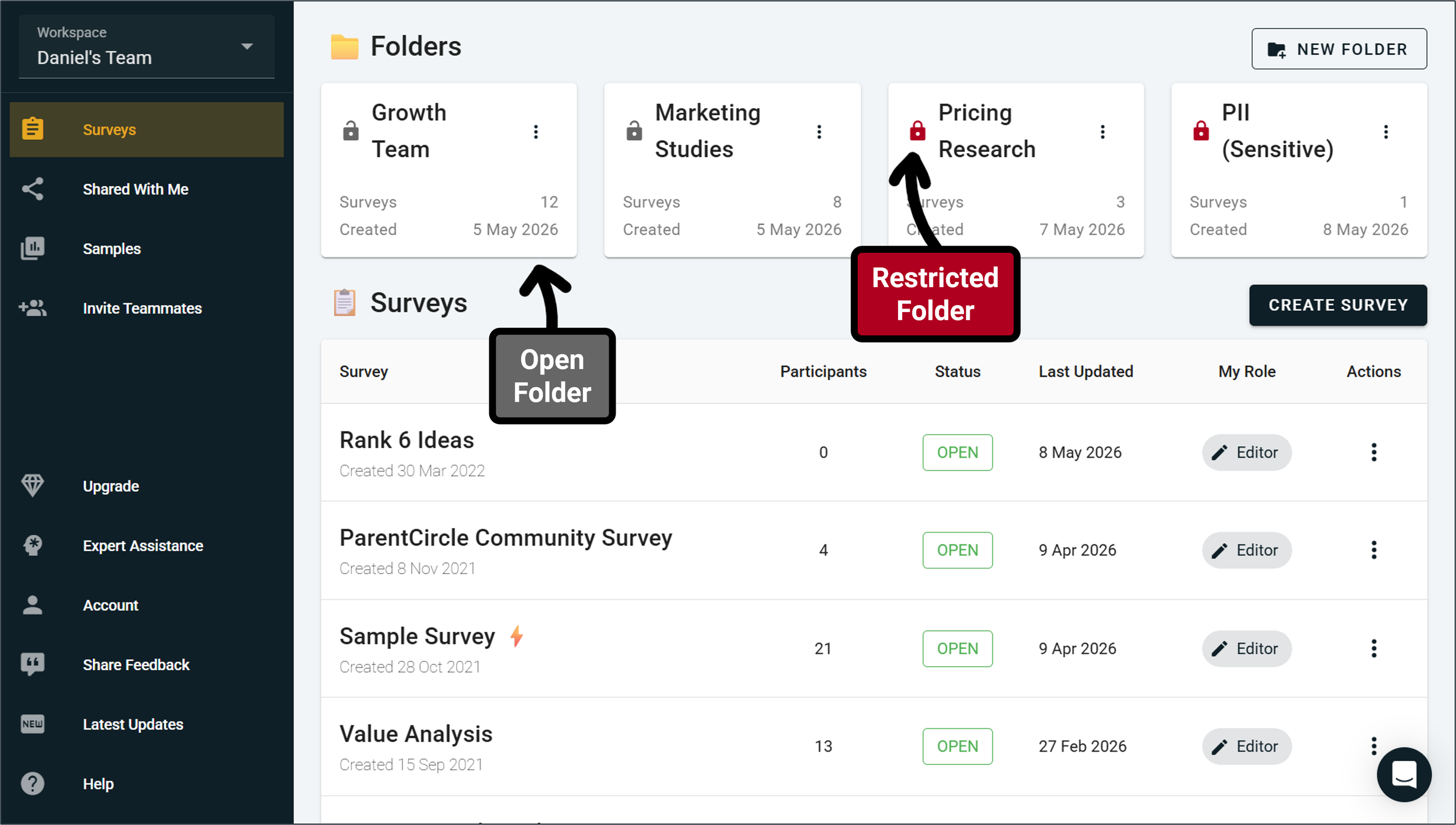
Before this update, your surveys lived in a long list on your workspace dashboard, arranged by creation date from newest to oldest.
Now, you can create folders for different teams, themes, or topics and arrange your surveys accordingly! You can also create folders within folders within folders, giving you full flexibility to create the organizational structure you need to match your team’s needs.
Users on the Free Tier, Ask Tier, and Analyze Tier can have up to 3 folders in their workspace, while Accelerate Tier workspaces have a higher folder limit along with access controls for each folder to restrict viewer access for surveys to specific teams or colleagues. Restricted folder are only visible to teammates you have granted access to — other than workspace admins, everyone else won’t even know it exists.
Other improvements included in this update:
The ‘Shared With Me’ tab, which previously gave you access to all surveys you’ve been added to as a collaborator but belong to workspaces you are not a member of, has been turned into a folder on your workspace homepage so that it’s easier to find.
Users who belong to multiple workspaces can now set a Default Workspace that will load automatically whenever they log into their OpinionX account.
Single-use unique links will no longer expire when associated with a partial complete participant, only on a full complete submission, preventing unwanted restrictions to respondents.
We’ve cleaned up the analysis buttons interface on Results Overview charts to make the design more visually concise and uncluttered.
The ‘export’ analysis button on individual results blocks will now export as images when you are viewing the Preference Chart display type.
We removed the checkboxes on Multiple Choice blocks when they are set to ‘Pick One’ only.
Introducing Matrix Grid questions on OpinionX (April 2026)
Today we're launching Matrix Grid as a new question type on OpinionX, which lets you ask many questions at once using the same voting scale.

Matrix Grid makes it a lot easier to compare a series of Multiple Choice or Rating Scale questions by treating them as one data set and helps respondents move through your surveys faster.
On OpinionX, Matrix Grid questions have two display modes you can pick from:
All At Once → A classic voting table with every row visible at the same time.
One By One → Each row becomes its own card in a quick stacked-vote flow, which works much better on mobile than the traditional table and helps reduce straightlining.
Here are examples of both Display Modes for OpinionX's Matrix Grid question type:
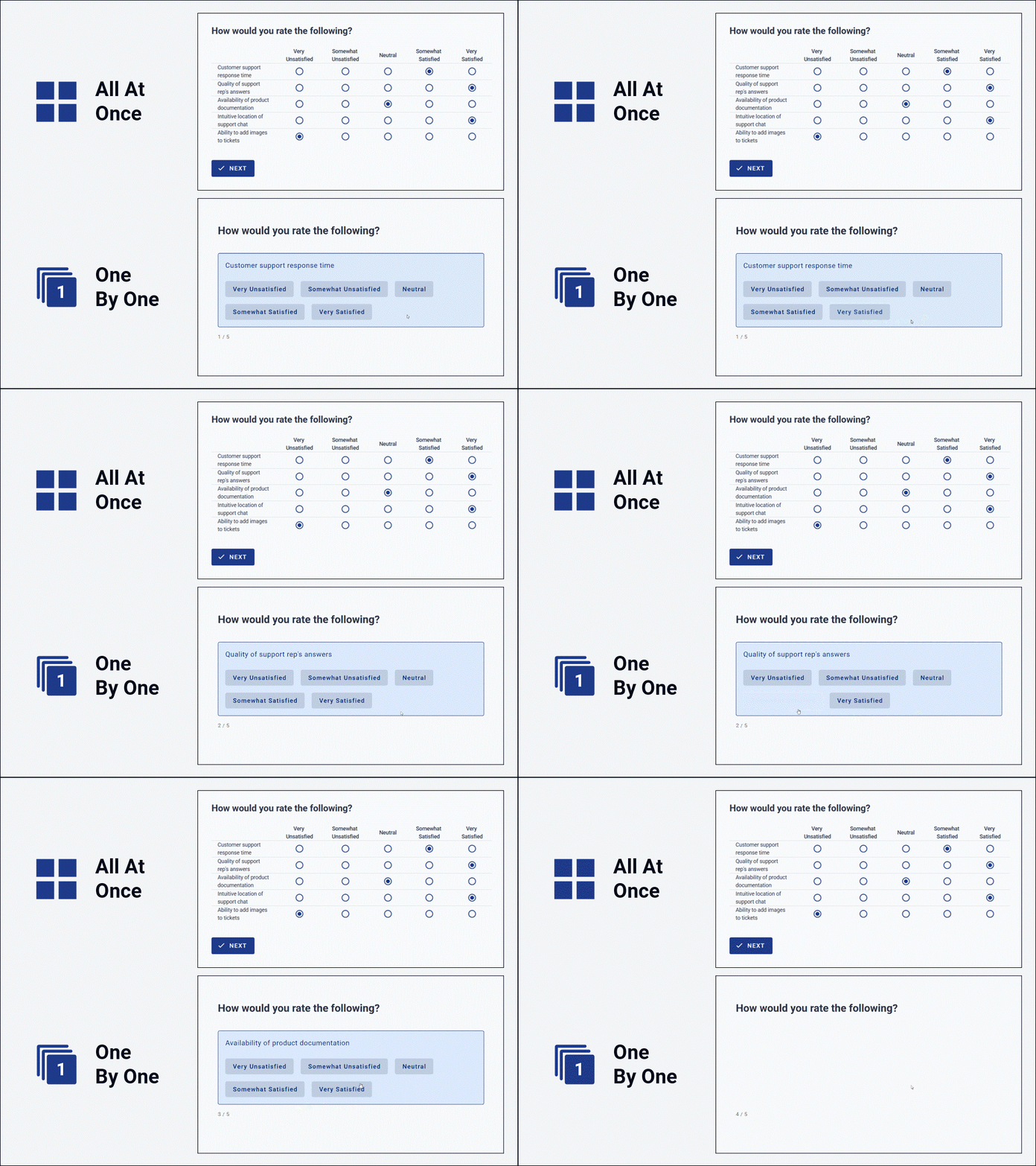
Desktop examples; both are automatically responsive to screen size and will adapt accordingly for tablet and phone users.
Numerical scoring scale
If your voting scale has an implied order — like "Very Unsatisfied" through to "Very Satisfied" — you can switch the scale from text to numerical and assign a number to each option. Configure this during setup and you'll automatically get calculated scores and ranks on your results dashboard later, without any extra work.
A common setup would be a 5-point satisfaction scale running from -2 to +2 to produce a net sentiment score per option:
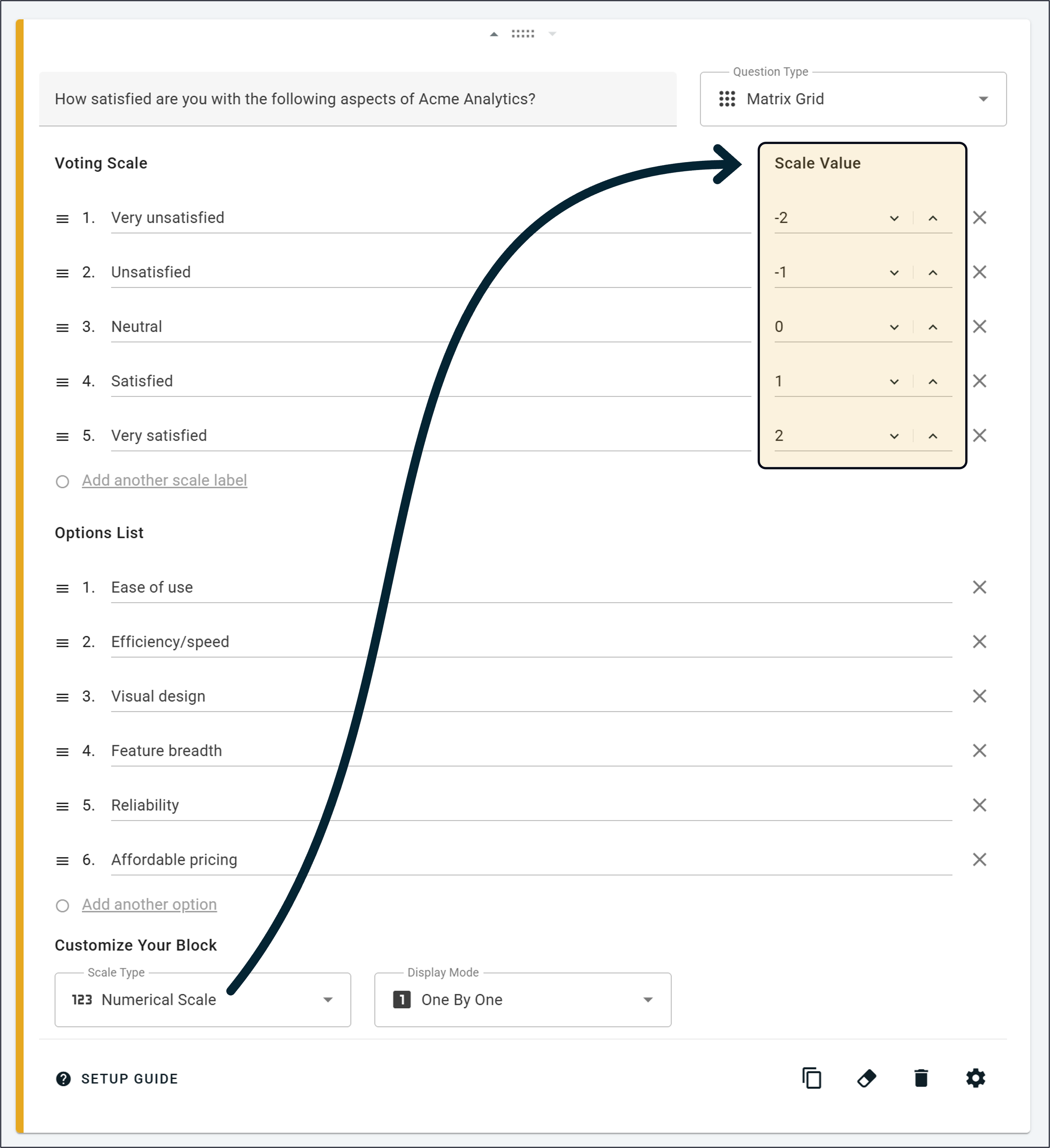
Customization options
Click the settings icon (⚙️) on the block setup card to access the full list of customizations:
Show Description — adds a smaller text field below the main question for extra context or prompting.
Mark As Optional — lets respondents skip rows via a Skip button instead of forcing a response on every row.
Randomize Row Order — shuffles the order of your options list for each new participant, useful for reducing order bias.
Multiple Selections Per Row — switches rows from single-choice to multi-select, so respondents can pick all that apply.
Vertically Oriented — stacks voting buttons vertically, one per line (only applies in the One By One display mode).
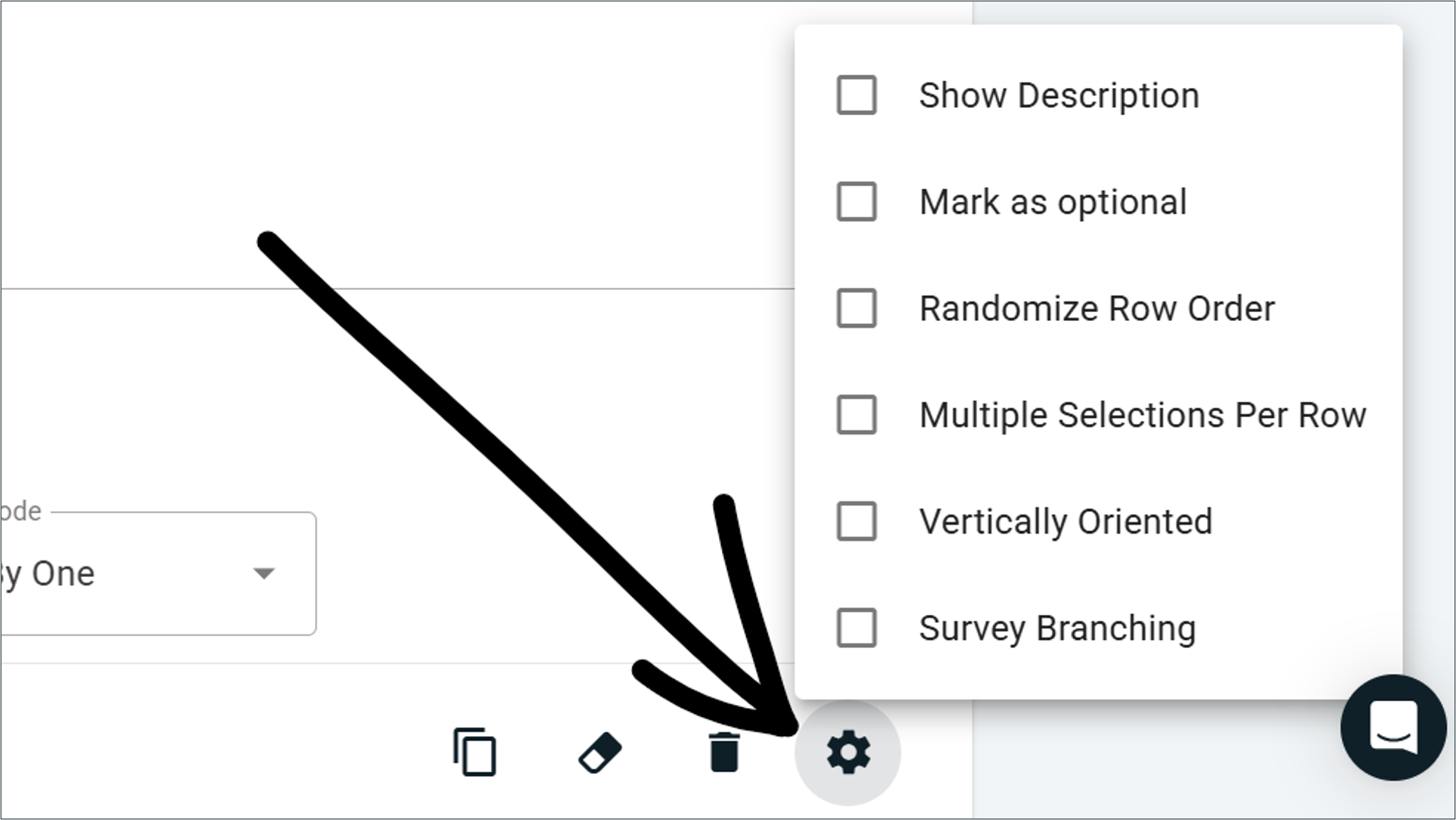
Learn more about how these customizations work here
Real-time results and analysis
As soon as responses start coming in, results appear automatically in two main chart formats.
Preference Chart
A horizontal stacked bar chart showing, for each row, the percentage of respondents who picked each level of your voting scale. It's the fastest way to read the overall shape of your results.
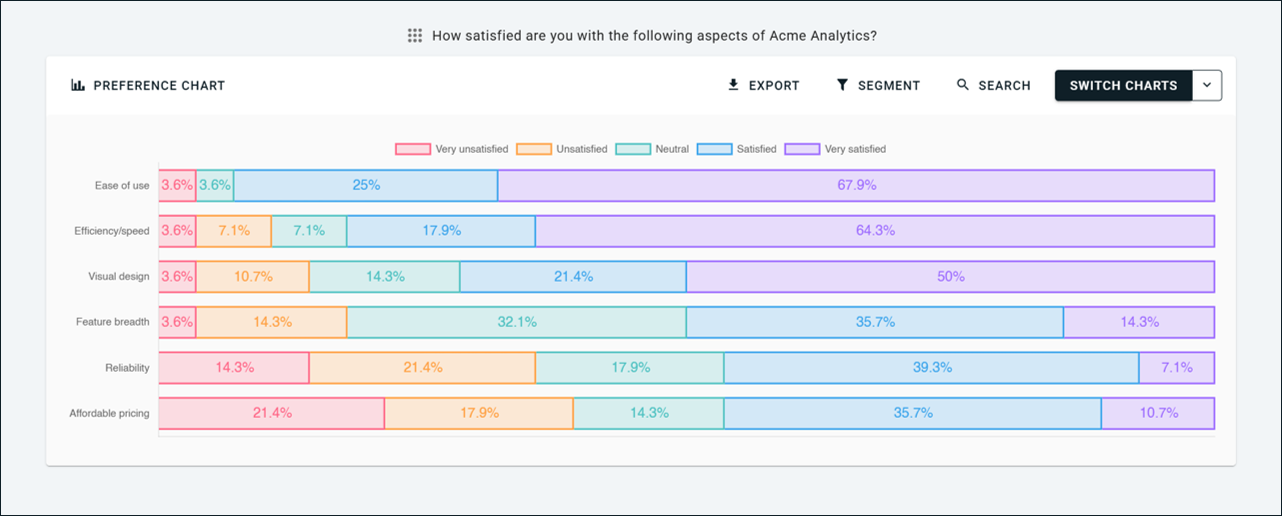
Survey Scores
A data table with a detailed breakdown of every row, including a Score column with the average score per row (when numerical scales are enabled), automatic ranking from highest to lowest average score, and per-column vote counts or percentages that are color-coded to highlight modal choices.
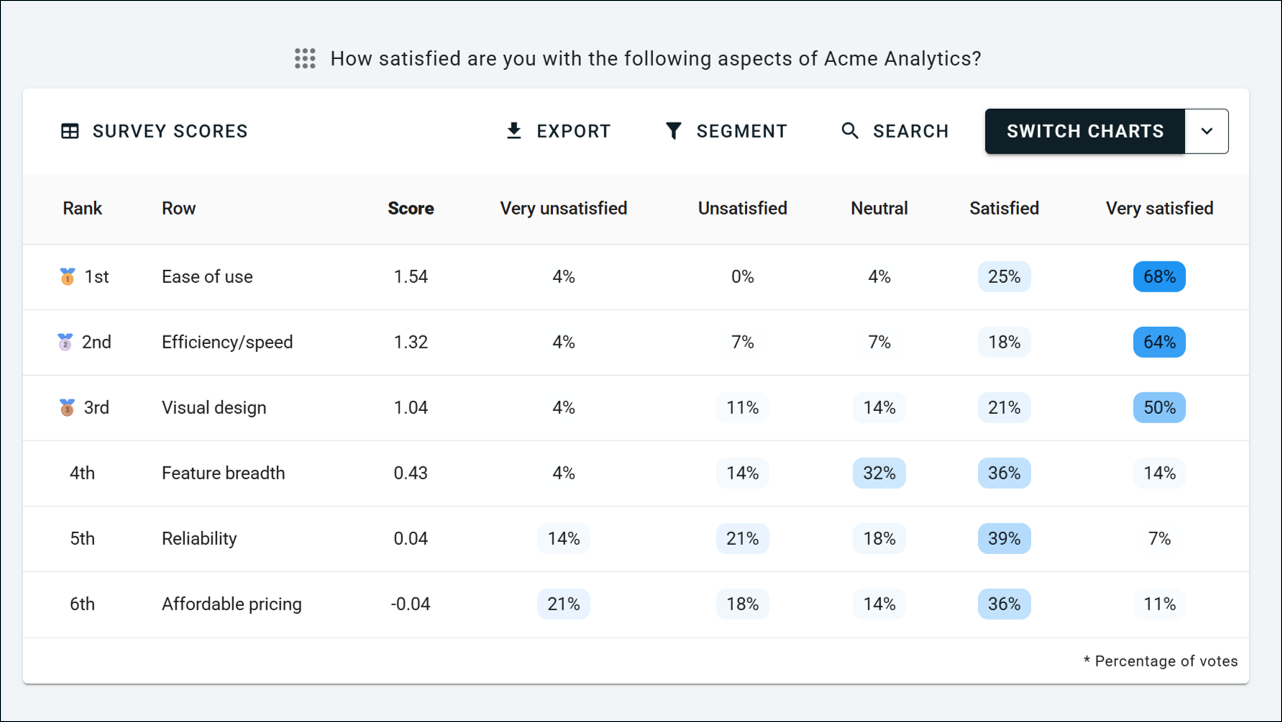
Matrix Grid questions also plug into the rest of OpinionX's analysis toolkit: Filter by Segment, Compare Groups Head-to-Head, the Segments Tab for crosstabulation, the Participants Tab, data exports, multi-language surveys, and partial completion views all work out of the box.
Available on every plan, including free
Matrix Grid is included on every OpinionX plan, including the free tier. That means unlimited Matrix Grid blocks, every chart type, segment filtering, head-to-head comparisons, crosstab reports, and exports, all included at no cost.
Note: Matrix Grid is the successor to our previous Agreement Rank question type. Same core idea (many options using the same voting scale) but significantly expanded functionality — new display modes, more flexibility, more customization options, and richer results. From now on, use the Matrix Grid block in place of Agreement Rank for any new surveys.
— — —
Other changes during April 2026:
We’ve added a cheaper entry plan, the Ask tier, to give people a more affordable way to prove OpinionX’s value at scale, to offer a superior ranking and polling platform to existing survey/form tools, and to cater specifically to people looking to run projects with up to 100 respondents.
We refined our refunds policy to make clearer how OpinionX subscriptions work, when refunds are permitted, and the conditions of renewal for yearly plans. This applies to all customers and can be found on our pricing FAQs, our product documentation about pricing, our Terms of Use that are agreed to at sign-up and purchase, and on the checkout page prior to purchase. For any questions about pricing terms, subscription conditions, and refunds policy, contact hello@opinionx.co.
A bunch of bug fixes and minor improvements, like helping more users find their workspace invite link so that they can make the most out of OpinionX’s unique offering of team workspaces with unlimited researcher seats.
Jump To Section on Preview Mode
Here are the latest updated we’ve added to OpinionX in March 2026
Jump To Section
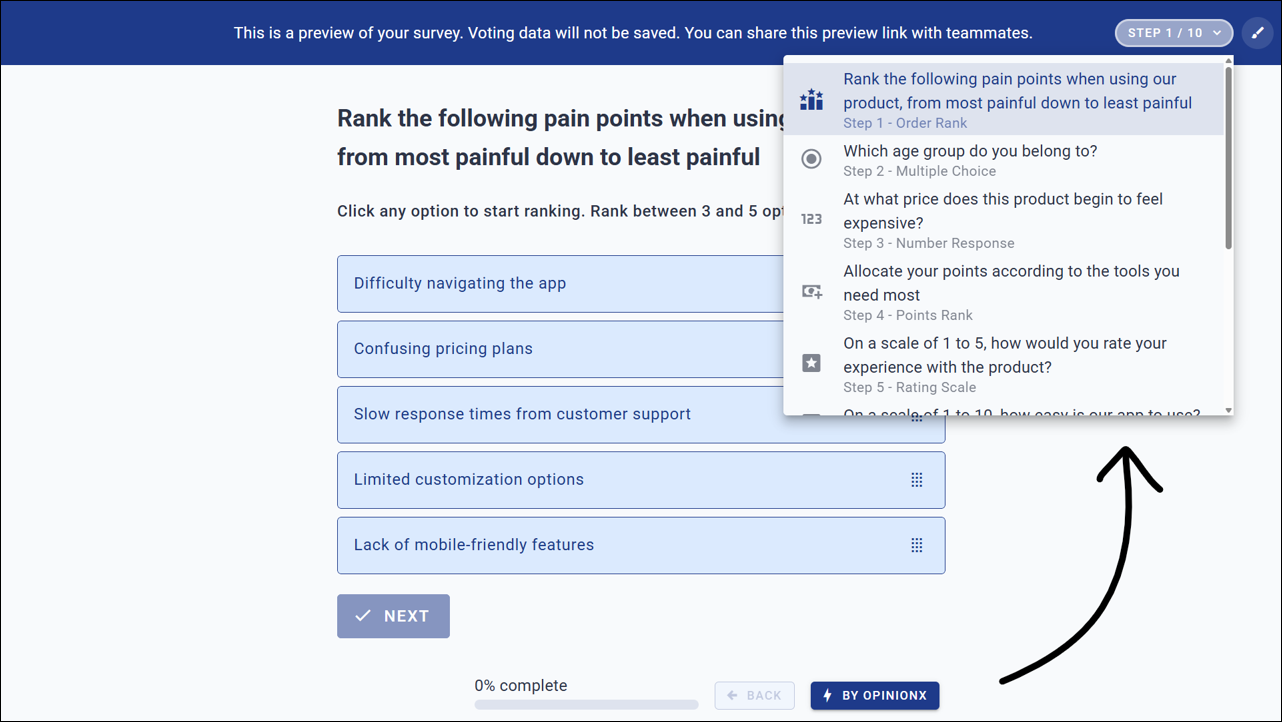
Preview Mode now has a dropdown component on the banner that lets you jump to any section in your survey. This has been a source of particular frustration for researchers running long surveys and needing to click through their OpinionX survey over and over again to test changes, confirm branching logic works, or see how their survey looks on different devices.
Other Updates:
Hide Progress Bar → A new dropdown on your settings page lets you hide the progress bar during surveys.
Language Dropdown → Made it easier to change the default language without enabling multi-language mode.
Exporting Fix → A bug was causing formatting issues on block exports with long question field text. Fixed!
More Languages → OpinionX now supports 131 languages in total, so you can run research in every possible market.
Multi-Language Surveys — One survey with many translations, unified results, filter by language
Create alternate language versions of your OpinionX survey that all feed into one unified results set. Perfect for international teams running conjoint, maxdiff, and segmentation research with their global customer base.
OpinionX now supports Multi-Language Surveys.
Create many versions of your OpinionX survey in different languages that all feed into one unified results set for easier combined analysis. This functionality makes OpinionX the ideal platform for international teams running conjoint, maxdiff, and segmentation research with a global customer base.

A new animated dropdown helps survey respondents find the right language before starting their OpinionX survey.
Previously, OpinionX researchers had to create separate surveys for each language, which is particularly complex for survey methods like maxdiff or conjoint analysis. Now, multi-language conjoint surveys are extremely easy on OpinionX!
Here are three cool details that we baked into OpinionX’s new multi-language functionality to make sure that this feature saves you as much time as possible…
1. AI Translations
When you add an additional language to your OpinionX survey, you can choose between three options: (i) Automated Translation, (ii) Duplicate Survey, (iii) Blank Version. The automated translation option uses AI to make an accurate translation of your entire survey in a matter of seconds.
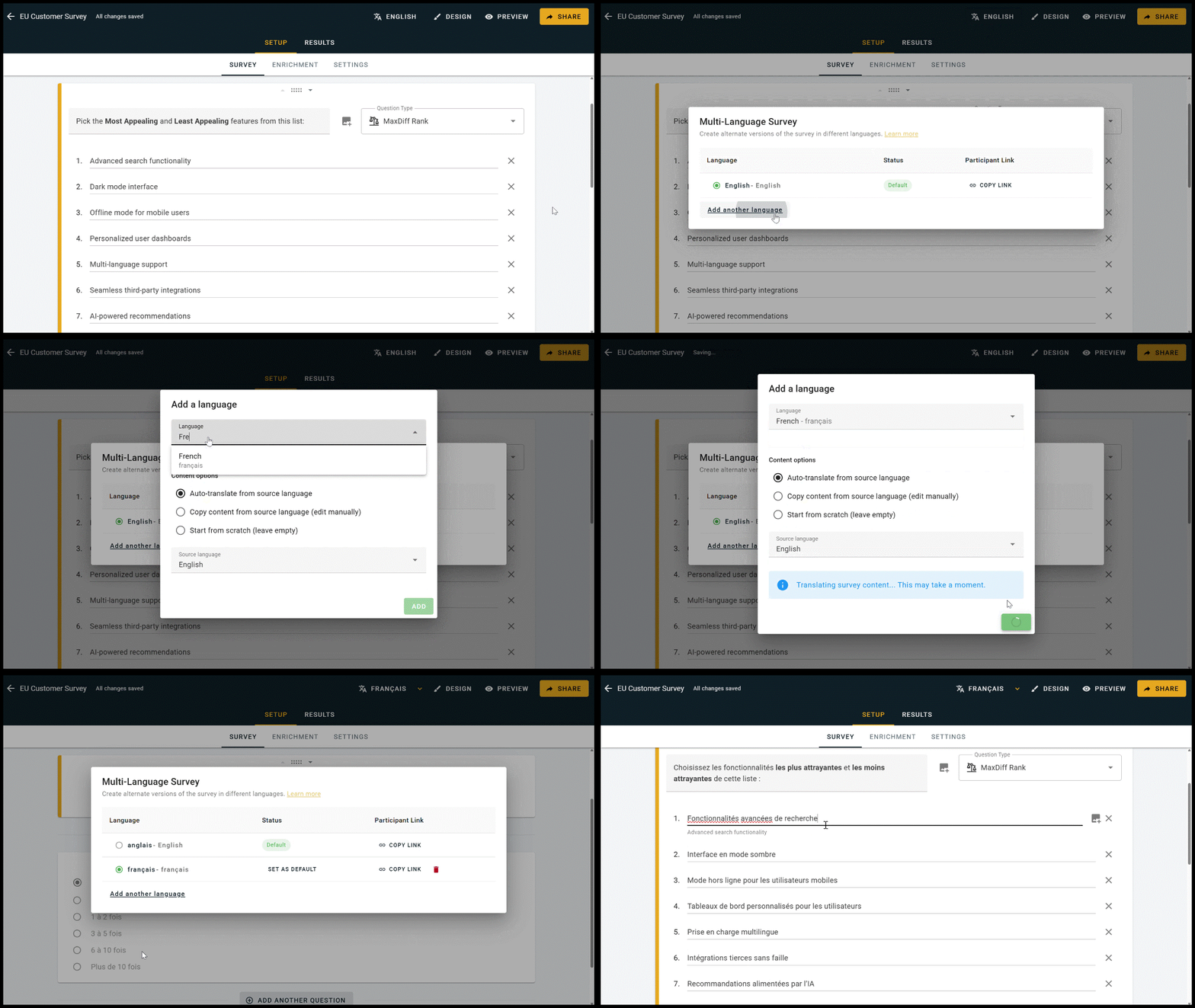
Multi-language survey setup on OpinionX, with AI-powered automated translation.
Clicking on any text field on the Survey Setup page reveals the parent text used as the basis for the translation, helping maximize your efficiency without needing to constantly switch between languages.

Clicking onto any field in Survey Setup reveals the translation source on the default version of your survey.
2. Participant Experience
Participants will see a dropdown on your survey’s Welcome Page that allows them to switch language. This animated dropdown shows the name of the current version (eg. ‘Language: English’) translated into each of the languages that the survey is available in (eg. ‘Idioma: inglés’) to help everyone find the right version for them.
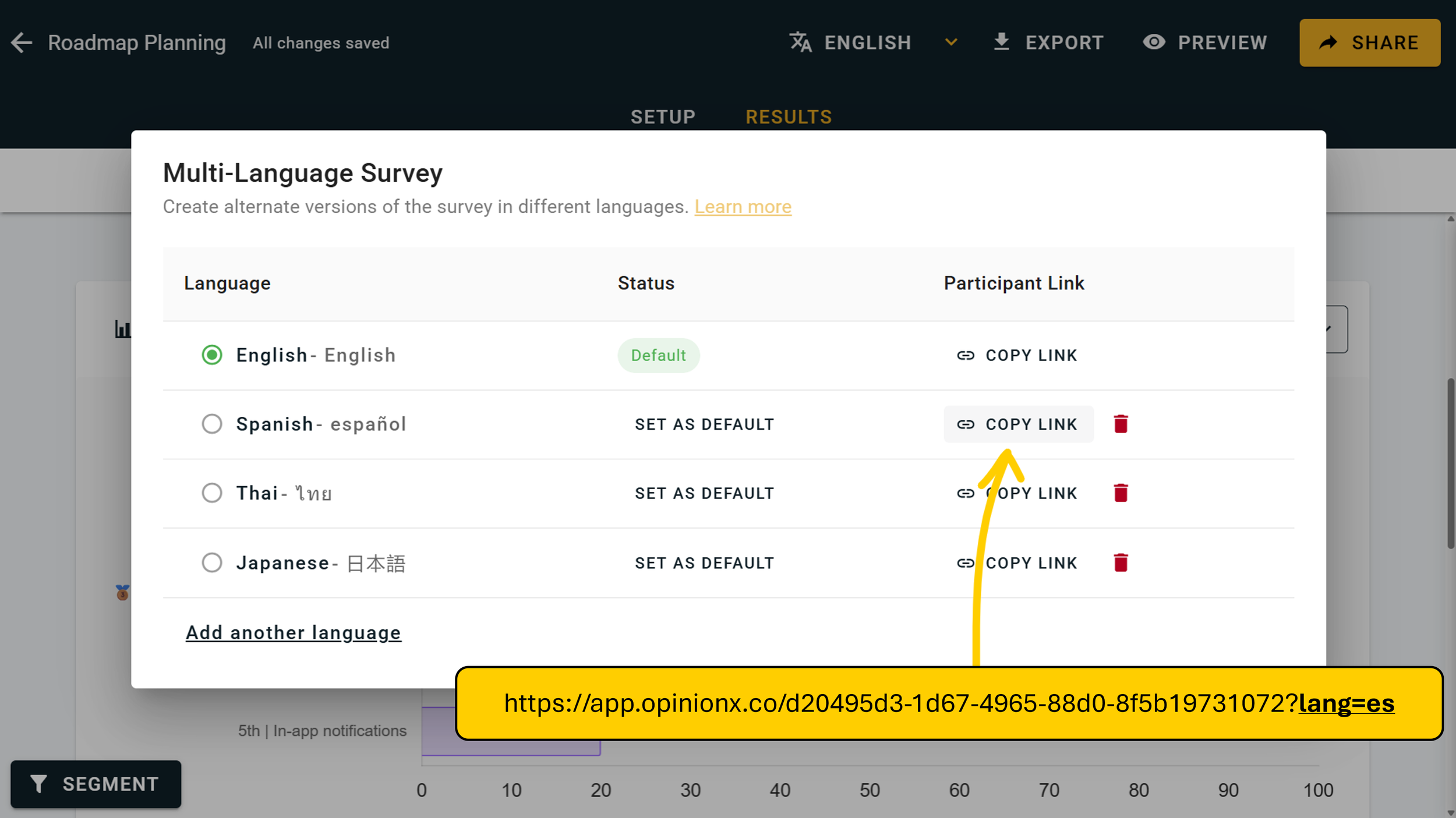
If you want to remove this choice, start by hiding the language dropdown by editing the Welcome Page on your Survey Setup tab. Then on the languages menu, you’ll see a ‘Copy Link’ option for each of your configured languages. These links add a URL parameter to the end of your participant link specifying which language the survey should load in (eg. ?lang=es for Spanish).
3. Filter & Segment by Language
One of the first questions researchers will ask once they’ve run their first multi-language survey is: “Do these results differ by language?” That’s why we’ve added a language option to OpinionX’s segmentation functionality, so that you can filter your results page by language, compare two languages side by side on the Compare Tab, and look at many language groups at once on the Segments Tab’s crosstabulation view.

Multi-language surveys are free on OpinionX
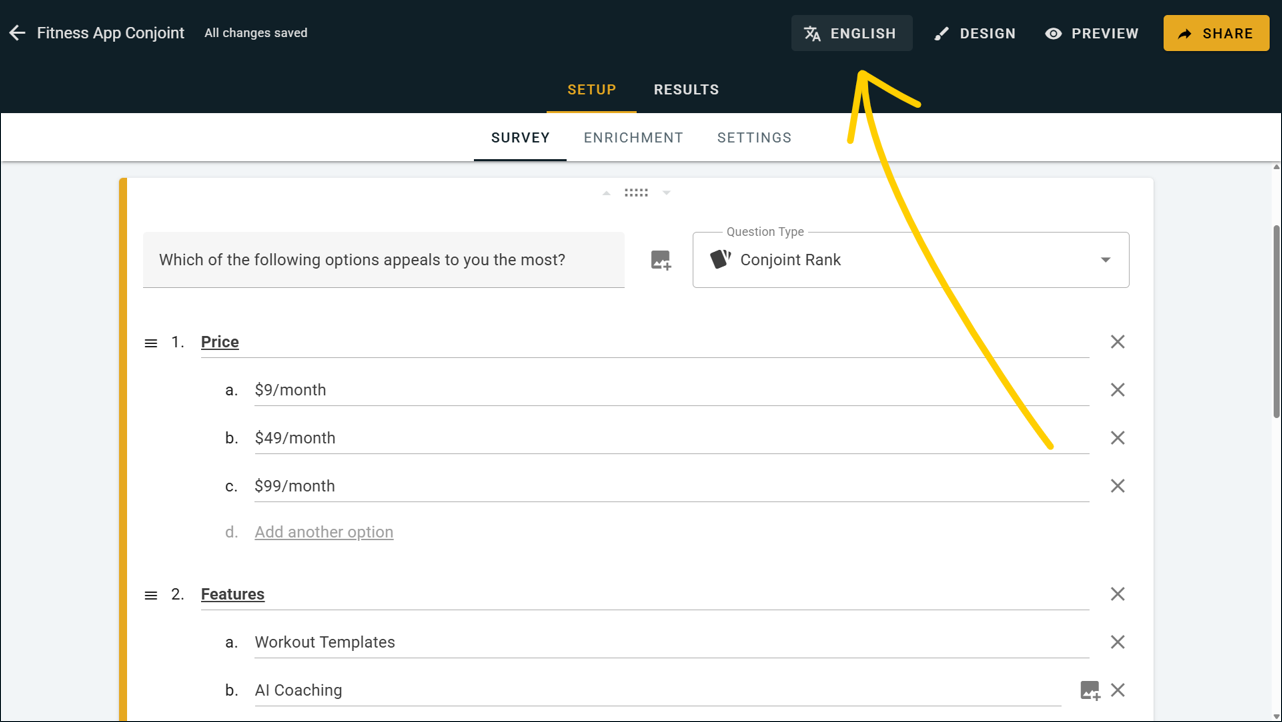
Best part of all? Multi-language surveys are available to all OpinionX users, including those on the free tier. There’s nothing you need to do to unlock this feature — simply hit the language button on the top navbar section of your survey dashboard:
— — —
Other February 2026 updates:
Moved the settings page into the Setup Tab on your survey dashboard.
Built a more robust SAML SSO process for customers on our Accelerate enterprise tier.
Fixed a bug that caused ‘None of the above’ data to disappear on saved simulator scenarios.
None of the Above → Adding Rejection to OpinionX’s Conjoint Surveys (January 2026)
We spent the month of January adding a range of new features to OpinionX’s conjoint analysis survey method — at the center of which is a customizable ‘none of the above’ voting option:
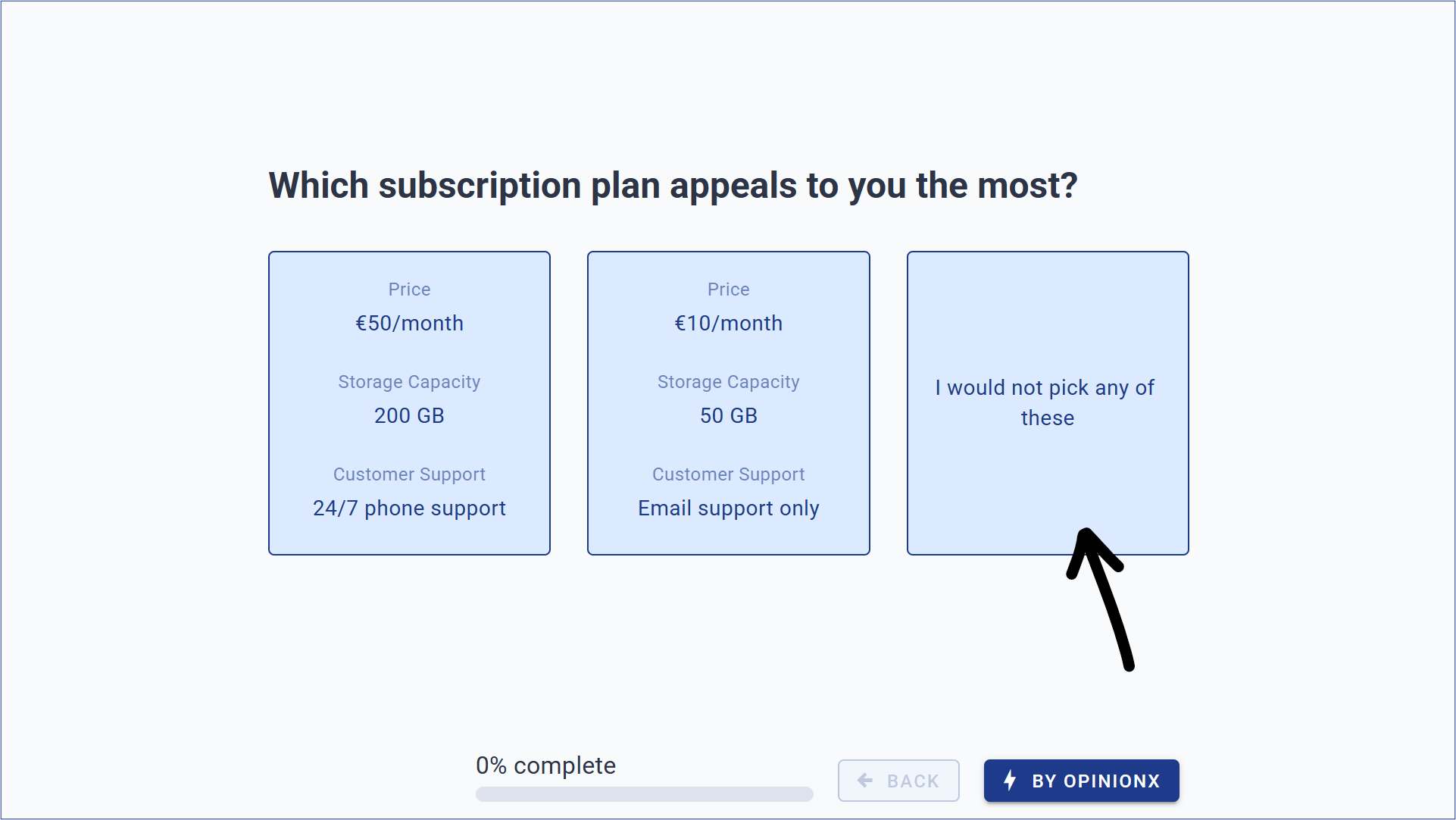
This ‘none of the above’ button can be customized to match your research requirements, like:
I would prefer to keep my current solution → Willingness to switch analysis
I would rather cancel my subscription → Churn indicator
Ní mhaith liom aon rud anseo → Match the button to your study’s language
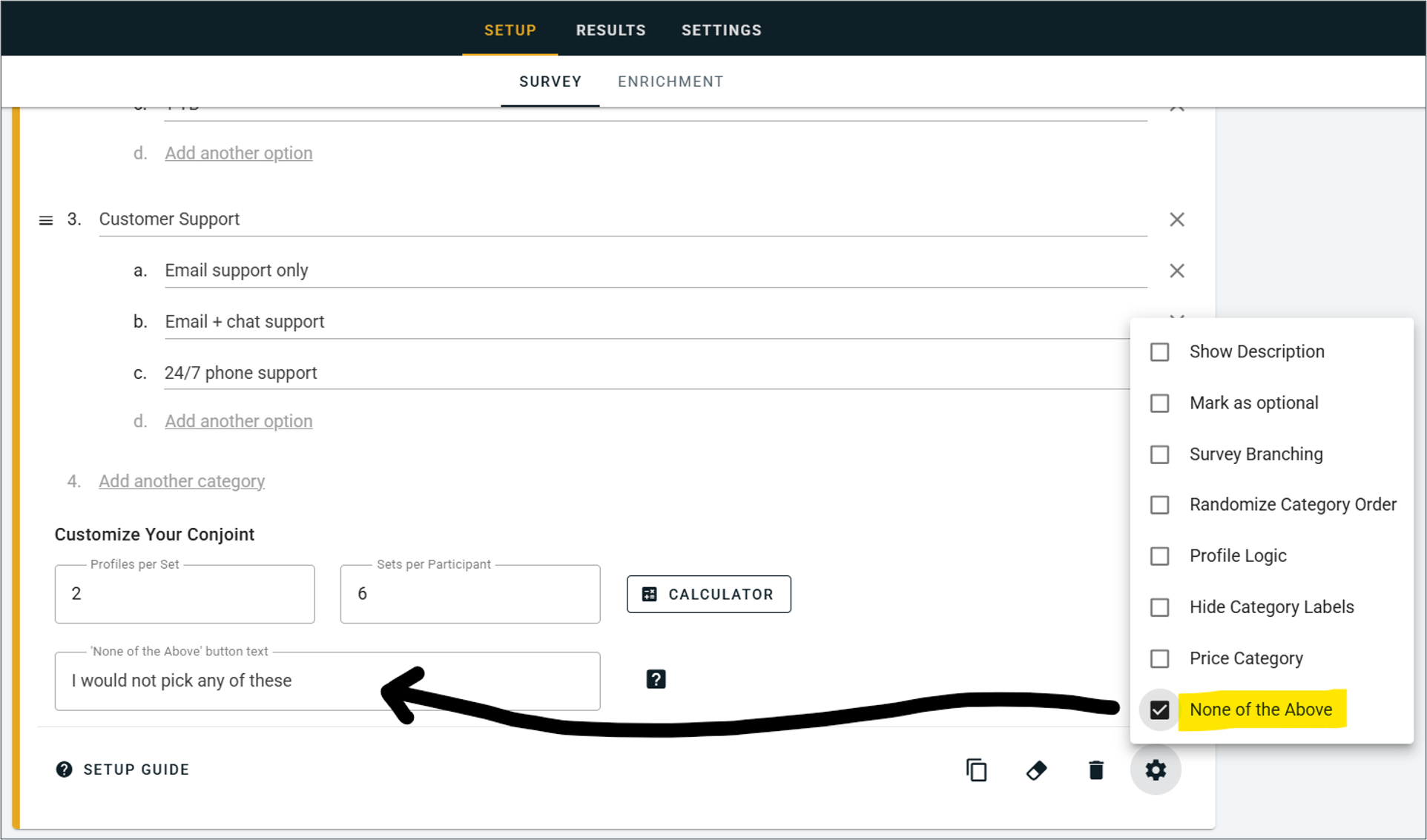
But we decided to go way beyond just adding one extra button — we considered all the different ways that researchers could use this rejection data to create insightful, actionable research on OpinionX. Here are three notable examples:
1. Rejection Rate
OpinionX’s new Rejection Rate chart for conjoint analysis surveys shows which options cause respondents to say ‘no thanks’ the most. It looks specifically at the percentage of votes where respondents chose ‘none of the above’ instead of a profile containing each option.
While conjoint analysis is typically used to see which product attributes are most important to customers, it can be equally powerful to see which options are dealbreakers that push customers to search for alternatives.

2. Churn Simulator
Conjoint simulators are typically used to study market share distribution (which product would customers most likely buy) or revenue projections (based on market share predictions, which product would generate the most money). But what these simulators often lack is a realistic opt-out option that incorporates customers that likely wouldn’t buy the product at all. We’ve added a churn factor into our Scenario Simulator on OpinionX’s conjoint surveys:

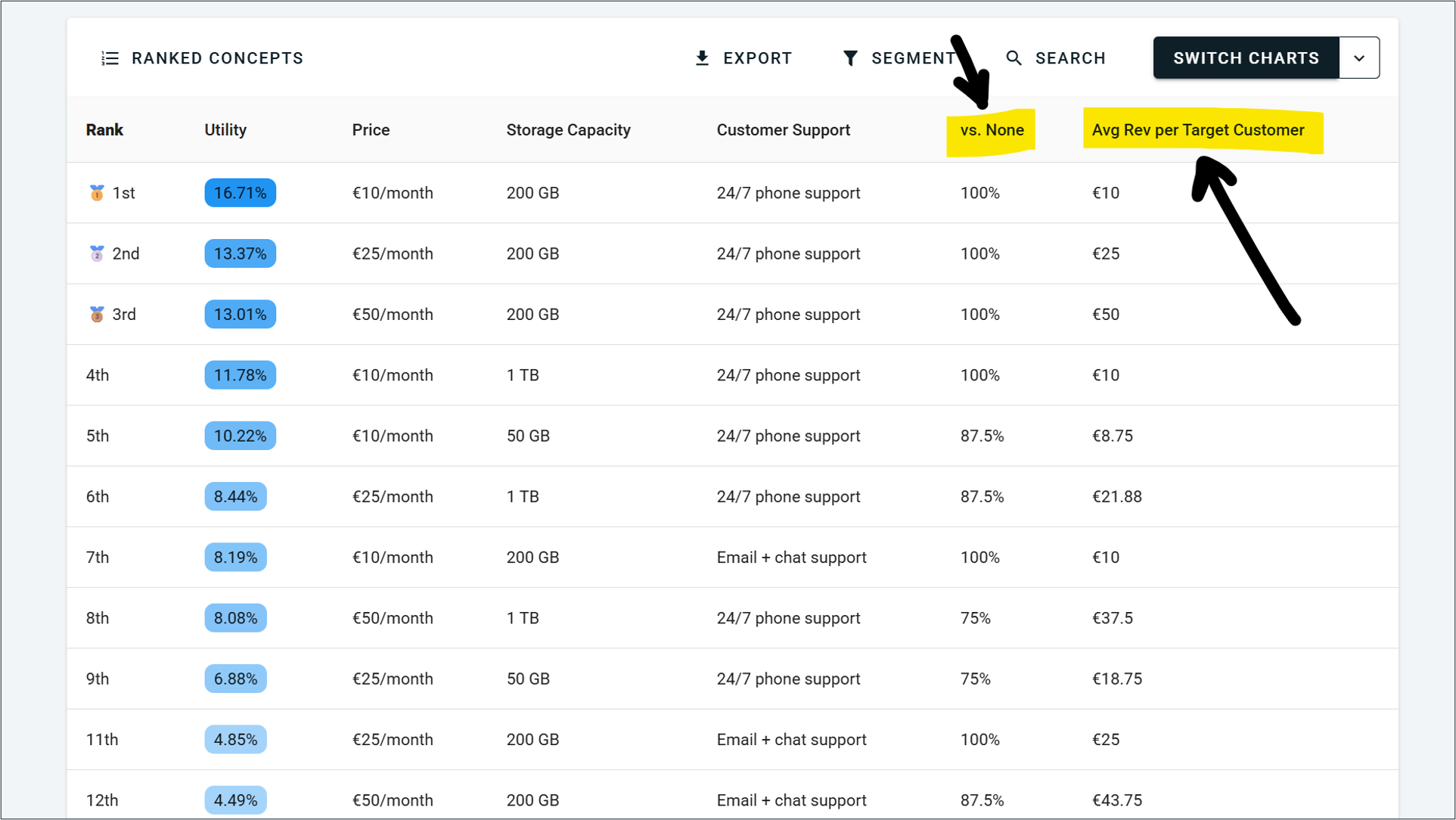
3. Ranked Concepts
OpinionX’s Ranked Concepts chart is like the market share simulator, except it runs every possible combination of options automatically to tell you what is most preferred. While this chart previously ranked the results by preference score, you can now toggle the list to find the most preferred combination with the highest opt-in rate or ARPU by accounting for respondents who would pick the ‘none of the above’ button during voting:
Also included in our January 2026 update:
Rejection rate stats from Conjoint Rank’s ‘None of the Above’ button are also scattered throughout OpinionX’s other analysis features, like the Participants Tab, Segments Tab, and Survey Exports.
We renamed Prohibited Pairs to Profile Logic and improved how this feature is explained to new users.
Analyze subscriptions now get 1.5 hours of prepaid consulting credits for Expert Assistance.
All new surveys now have a link enabled for publishing and sharing their interactive results with anyone.
You can now configure your price attribute directly on the analysis dashboard for conjoint charts like the Revenue Simulator and Marginal Willingness To Pay. No more digging back through your survey setup to do this :)
Changed the overview metric from Average Duration to Median Duration to give you a more relevant view of how long your survey is taking participants to complete, without outliers skewing this metric in an unrepresentative way.
Added more UI references to the participant limits added in our December 2025 pricing update.
Fixed an issue that was preventing the Clusters Tab from running its analysis for some customers.
Next month 👀
We’re already busy working on Multi-Language Surveys to enable researchers to run one survey in many different languages as a single dataset — something I know you guys have been keen to see added to OpinionX for quite some time. Expect further news on this in early March.
Why we’ve updated OpinionX’s pricing plans (December 2025)
Earlier today (December 16th at 10:00 UTC), we rolled out a range of changes to our pricing plans which have altered the functionality available and limits applied to each tier of OpinionX:
We’ve unlocked all survey setup and analysis features on the Free Tier.
We’ve added new participant limits to all survey data, including the overview results tab:
Ask Tier (Free) = 10 participants
Analyze Tier = 1000 participants
Accelerate Tier = Unlimited participants
Analyze tier subscriptions now include 90 minutes of prepaid consulting time with an expert researcher.
OpinionX is designed specifically for advanced market research surveys — methods like maxdiff, conjoint, and segmentation analysis. Over time, our pricing and limits drifted out of alignment with that focus. We were significantly underpriced relative to comparable tools, which created confusion for teams evaluating OpinionX seriously, while still not being a good fit for more casual survey use cases. These changes make it clearer who OpinionX is really built for.
We’ve simplified our pricing plans considerably. The free tier previously allowed unlimited responses but locked most analysis features, which many people understandably found confusing or frustrating to discover after already launching their surveys. We experimented with preview modes and partial unlocks but these experiments ultimately made things feel more complicated rather than transparent. This new structure is far simpler — survey setup/analysis features are now available for all users to test on the free tier with a clear 10-participant limit, while our premium tiers focus on scale, security, and collaboration.
Finally, we want to make sure teams running advanced studies have the right level of support to succeed. OpinionX surveys tend to incorporate more complex research methods than form-builder tools like Typeform or Google Forms. To ensure we can spend the time needed with customers to help them use these research methods (often for their first time), we’re bundling prepaid expert assistance into all premium plans. We will continue offering technical support over live chat on the free tier and personal product demos to those evaluating OpinionX for their research.
We appreciate that this is a shift for many users and we’re here to support you through these changes. Overall, this update is about adding more clarity to our pricing, long-term commercial sustainability to OpinionX, and the resources needed to ensure we can continue to serve product research teams to succeed with their research.
Conjoint Rank upgraded to Hierarchical Bayes scoring model (HB-MNL) and HMC scenario simulator
OpinionX’s conjoint analysis format now uses an industry-standard HB-MNL model and HMC-powered simulator, delivering more accurate utilities, clearer attribute-importance charts, and more reliable market-share forecasts.
This is the first in a series of improvements to OpinionX’s Conjoint Rank question type.
What Changed?
On December 9th 2025, we replaced OpinionX’s old linear-regression scoring algorithm with a Hierarchical Bayes Multinomial Logit (HB-MNL) model. Additionally, the scenario simulator chart now uses a Hamiltonian Monte Carlo (HMC) sampling system. These are best-practice, industry-standard approaches for choice modelling, so this update will give you more accurate, stable results from your same OpinionX survey data.
Why Does This Matter?
HB-MNL borrows strength across respondents, so individual preference scores are estimated more robustly, even if you collect significantly fewer votes than on the old LR scoring model.
HMC produces faster, more reliable sampling in the simulator, yielding better convergence and more accurate market-share forecasts.
Attribute importance is now reported as percentages that sum to 100%, making relative trade-offs clearer and attribute (category) importance a lot easier to interpret.
The Details:
Advanced Algorithm → Under the hood, HB-MNL applies a population-level prior and Bayesian estimation for each respondent. In effect, each person’s part-worth utilities converge more quickly and accurately.
Attribute Importance Chart → The importance of each category previously showed the part-worth utility range of each category’s highest and lowest-scored levels. The new HB-MNL model shows the proportion of total preference that participants allocate to this attribute (summing to 100% across all attributes). This percentage‐based chart is the same output style used in HB-based conjoint analyses, giving a clearer picture of how much each category drives choices along with a more industry-standard chart format.
Richer Participant Scores → Because of the HB approach, individual preference scores are much more stable and precise, even with fewer votes per respondent. In practical terms, you’ll find that each person’s utility profile feels more consistent and less noisy than before, reflecting real preferences more faithfully.
Improved Scenario Simulator → Our scenario simulator now runs its MCMC sampling via Hamiltonian Monte Carlo. HMC is a smarter sampler that explores the utility space more efficiently than traditional sampling. The result is faster convergence and more accurate market-share forecasts for any hypothetical profiles you create.
Automatic Roll‑Out → All existing conjoint surveys (free and paid) have already been re-scored with this new model, so nothing is required on your part. Your old results and charts were already updated to the improved HB analysis and recalculated automatically.
What you need to do
Nothing! This update has already happened and your old Conjoint Rank surveys have already been migrated to the new model. Your survey setup and participant voting experiences remain exactly the same as before. What you may notice is higher-fidelity results and more intuitive charts.
Want to learn more?
Usability Improvements: November 2025
Back with our final batch of this three-part usability improvement efforts that we have spend the past few weeks on:
Completion time for each participant added to the “View Participants” dropdown list.
Improved the experience for drag-and-drop ranking your first option on Order Rank.
Blocks with incompatible setup now tell you that they won’t appear in your survey.
When you duplicate a block during survey setup, the new duplicate becomes the active editing block.
Improved the logic for showing the “Design Inspiration” options during setup.
Export functionality unlocked on sample surveys to help with feature exploration.
Fixed a bug causing components on Points Rank to wrap incorrectly during voting.
Fixed the “Add Another Question” button during survey setup on mobile devices.
Fixed a bug with max-choices on Multiple Choice blocks when you have a custom “Other” write-in enabled.
Made custom “Other” easier to find during Order Rank and Points Rank setup.
These past three batches of changes have been making a big difference by fixing small issues throughout OpinionX.
We’re always keen to hear about the little things in OpinionX that frustrate you, add a bunch of extra work, or created unnecessary confusion for you — let us know!
Usability Improvements: October 2025
Another round of fixes, improvements, and love-and-care for OpinionX!
This update has fixed a long list of pet peeves that will make the user experience significantly better for everyone on OpinionX:
Order Rank has had a range of mobile-specific usability improvements to make ranking a smoother experience.
A new Design button at the top of your survey dashboard will take you directly to the Custom Themes menu.
“Skip” is now hidden by default and can be shown by enabling “Mark as optional” on a block during survey setup.
When bulk copy/pasting options into OpinionX, you’ll now see a button for overwriting existing options (so you no longer need to manually delete “Ranking option 1” afterwards).
Removed the 2-option forced requirement on Multiple Choice blocks for more flexible setup.
Voting checkboxes on MaxDiff Rank blocks now appear inside the card for each statement rather than floating outside.
The color of voting checkboxes now match your survey background color rather than the voting component.
Fixed a bug that was causing copy/pasted options on Order Rank to randomize in order unintentionally.
“Other” on Multiple Choice no longer activates when participants hit “Enter” to proceed to the next section.
Hitting the “Enter” will now move participants to the next question on a Text Response or Number Response block.
Text Response block animations were briefly disabled for participants but have now been reactivated.
Increased the padding between ranking option text and images on Pair Rank for a cleaner interface.
We made the Saved Segments window wider so that info fits on screen correctly.
Number Response answers can now start with a decimal point, rather than needing a 0 to appear first.
A new section displaying custom “Other” answers appears below the Preference Chart for Order Rank and Points Rank.
Rank positions now appear alongside the text label on Preference Charts for all ranking blocks.
Each file in a Raw Data export now comes with a customized name to help you find the right data faster.
Fixed a formatting issue for the “Average Duration” metric for long surveys with >59m59s duration.
Fixed a bug that was temporarily causing the Section Divider to have display and editing issues.
Usability Improvements: September 2025
We just shipped the first of three usability improvements updates that will make OpinionX a lot easier to use for researchers and survey participants! Here’s what was included in the first batch…
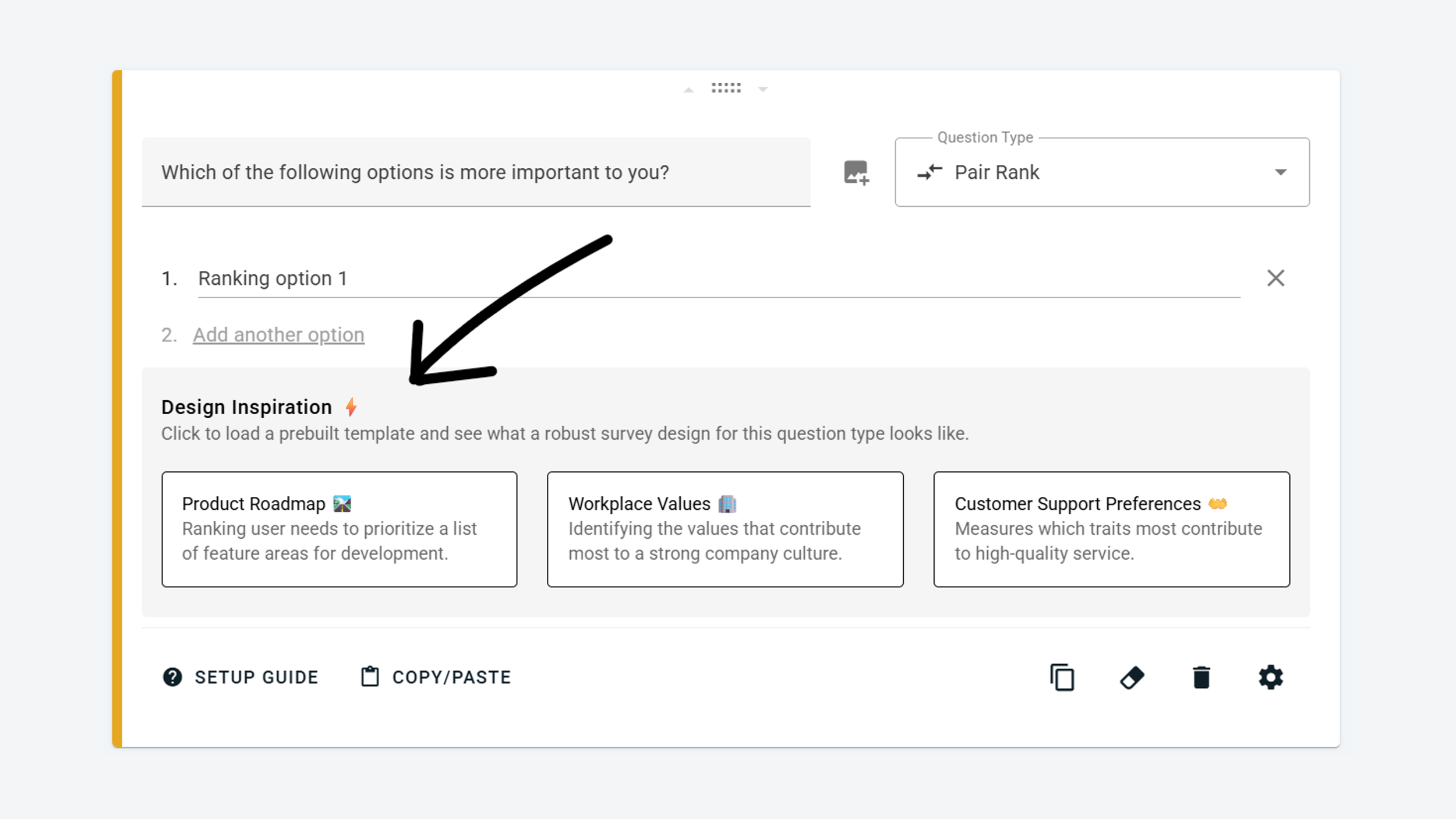
Design Inspiration ⚡
When you create a new block on OpinionX, you’ll now see a “Design Inspiration” section. Clicking any of the white tiles here will prefill your block with a question and ranking options, helping you to see how that ranking method should look once ready to launch.
Once activated, the template can be deleted using the “Reset” eraser icon in the bottom-right corner. If you’d rather ignore this prompt, just continue setting your question up and the Design Inspiration section will disappear automatically:
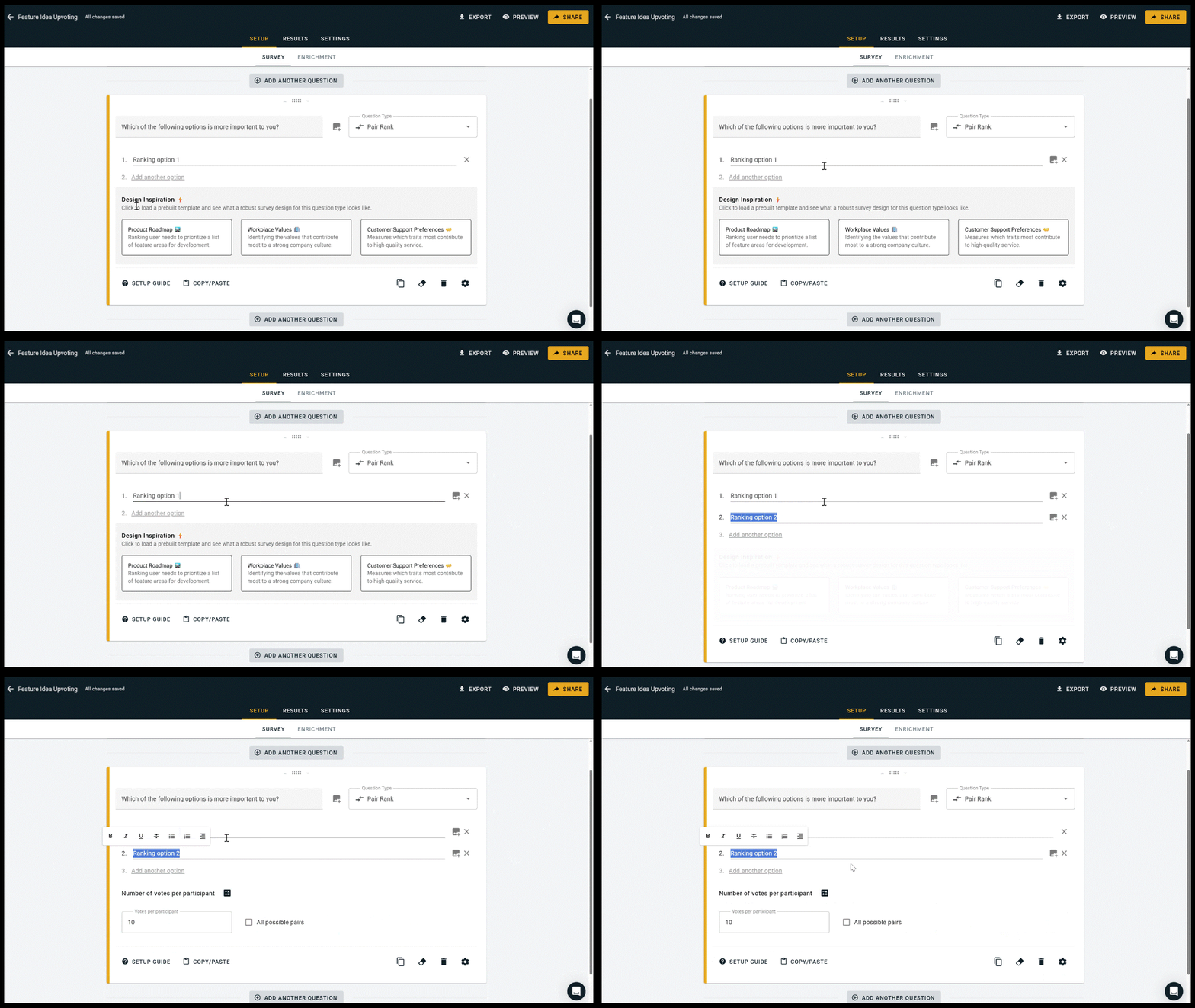
^ The new templates section knows how to take a hint when you’re not interested in it :)
— — —
Enforced Voting Rules 🗳️
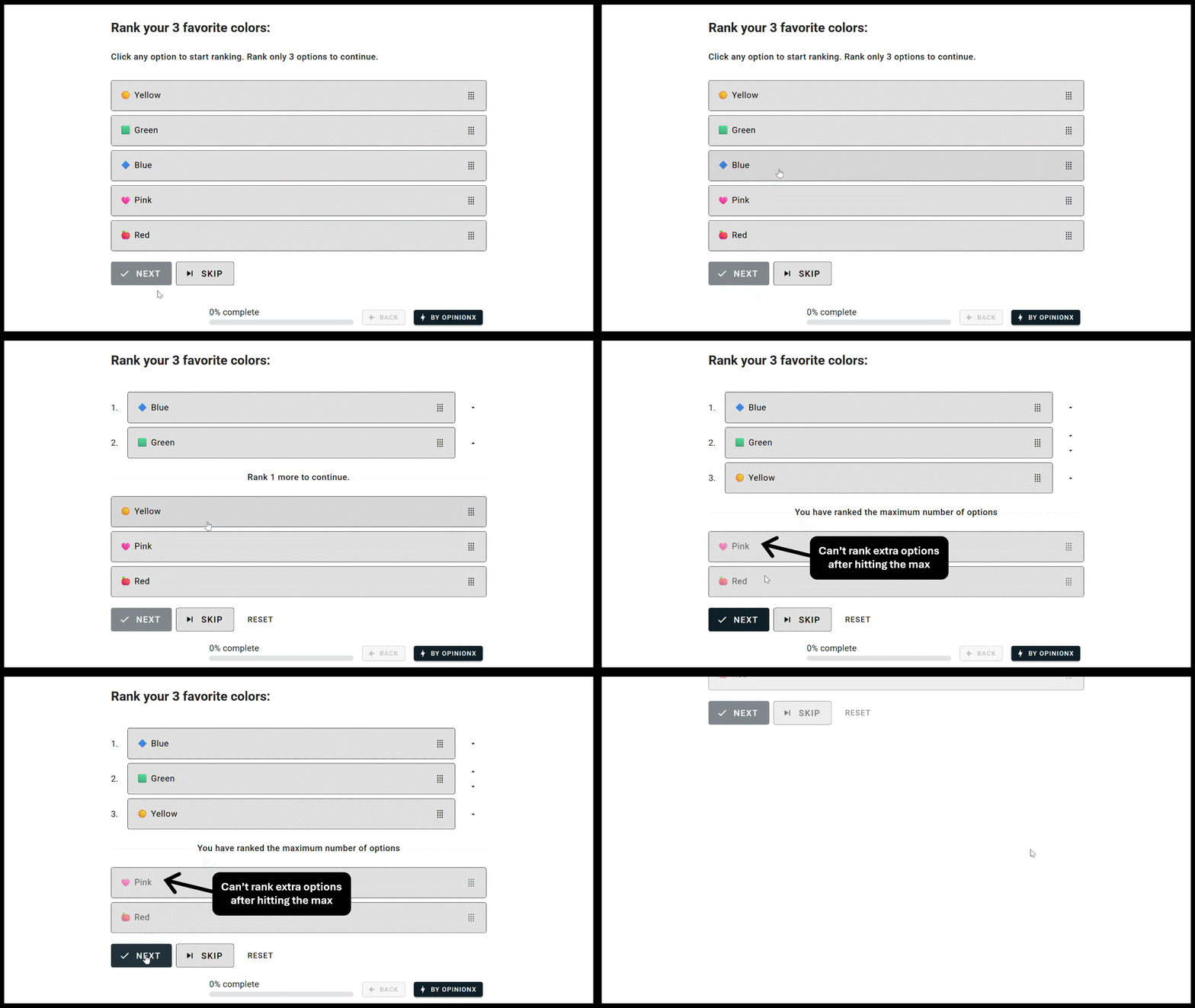
OpinionX already had settings for choosing a minimum or maximum number of options someone can vote, but now we’ve given these settings a round of important improvements:
Until you reach the minimum number of votes, the “Next” button is clearly not clickable.
Prompts now clearly state how many votes someone must cast before they can proceed.
Once the limit is reached, other options are disabled to prevent over-voting unintentionally.
Below you can see an example on an Order Rank survey, and this same approach has been added to Points Rank and Multiple Choice block types too.
— — —
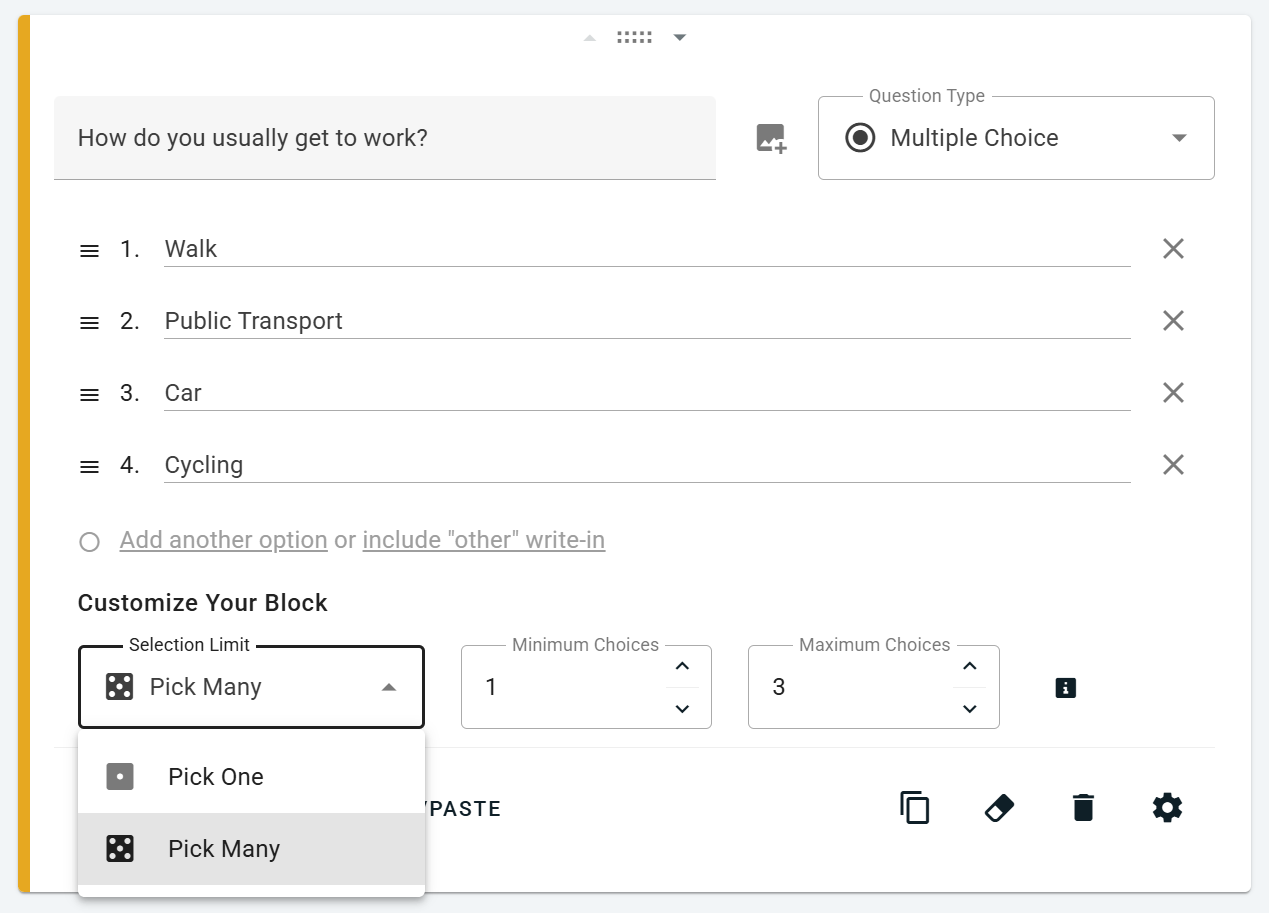
^ The new “Pick One/Many” dropdown for Multiple Choice blocks, which is now shown by default during survey setup.
Other Changes
The results page will now prompt you to check out relevant sample surveys if your survey has no participants yet.
There are now three image sizes you can pick when adding a main picture alongside your question text: thumbnail, large, and banner.
We’ve set more customization options to be shown by default during survey setup instead of hiding them away, like the “Profiles Per Set” variable for Conjoint Rank, the “Options Per Profile” variable for MaxDiff Rank, and the Min/Max Votes customization on both Order Rank and Multiple Choice block types (screenshot shown).
The MaxDiff Rank setup calculator and Conjoint Rank setup calculator have both had some bugs fixed and we’ve added extra flexibility so that you can test different setup configurations more easily.
Survey Setup Improvements! 🥳
We just added a bunch of improvements to the Survey Setup page that will make your life a lot easier when creating OpinionX surveys:
Reorder Mode makes it easier to drag blocks to difference sections of your survey.
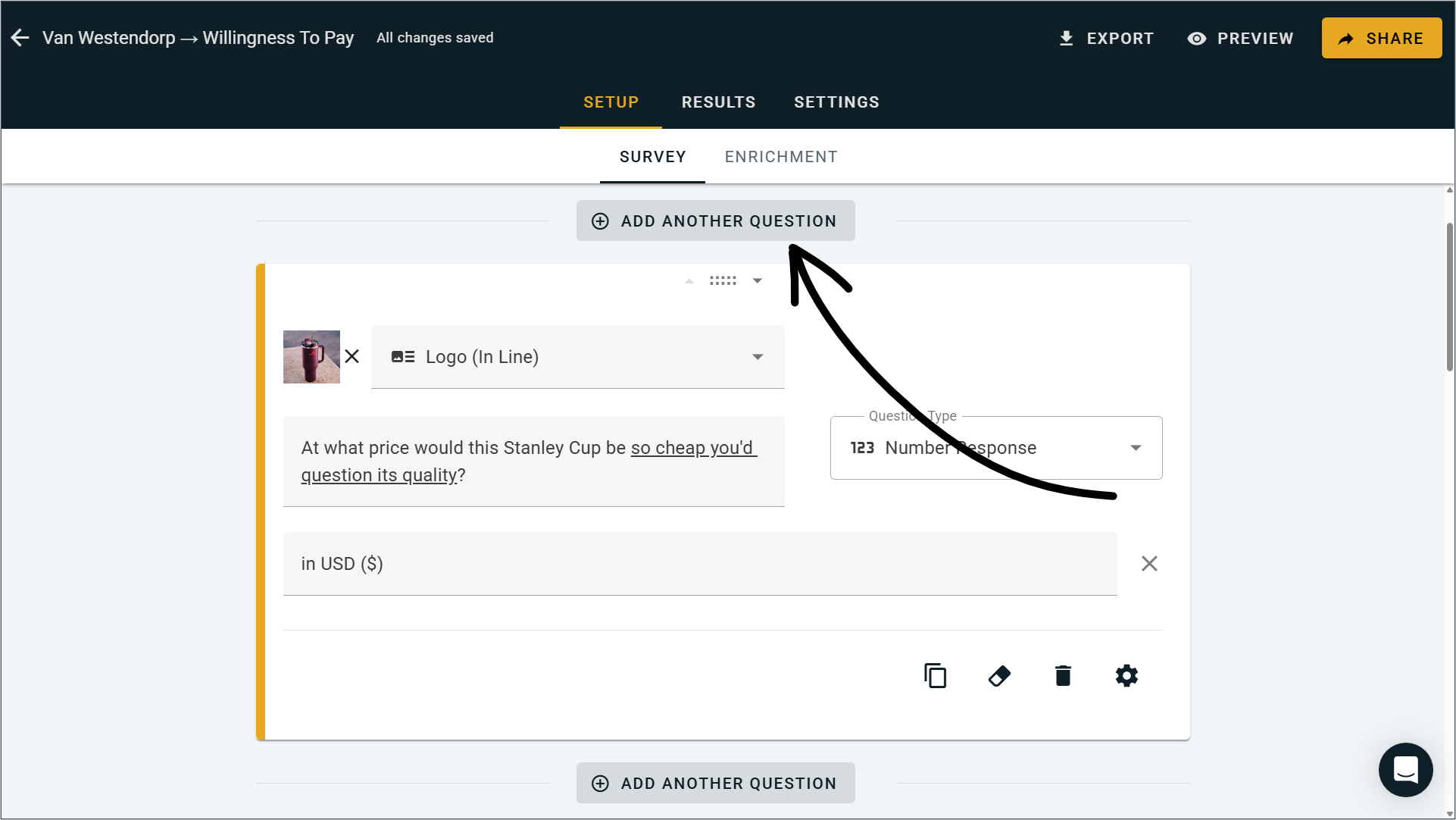
The ‘Add Block’ button has been replaced by clearer ‘Add Another Question’ buttons between each block.
We split the Identify block out into its different question types (Email, Name, etc.) each as a separate block type.
Text Response blocks can now be set to Short Answer or Long Answer, which changes the text box size.
We added a new sort-by method for Multiple Choice bar charts.
We improved the quality of translations across all OpinionX survey languages.
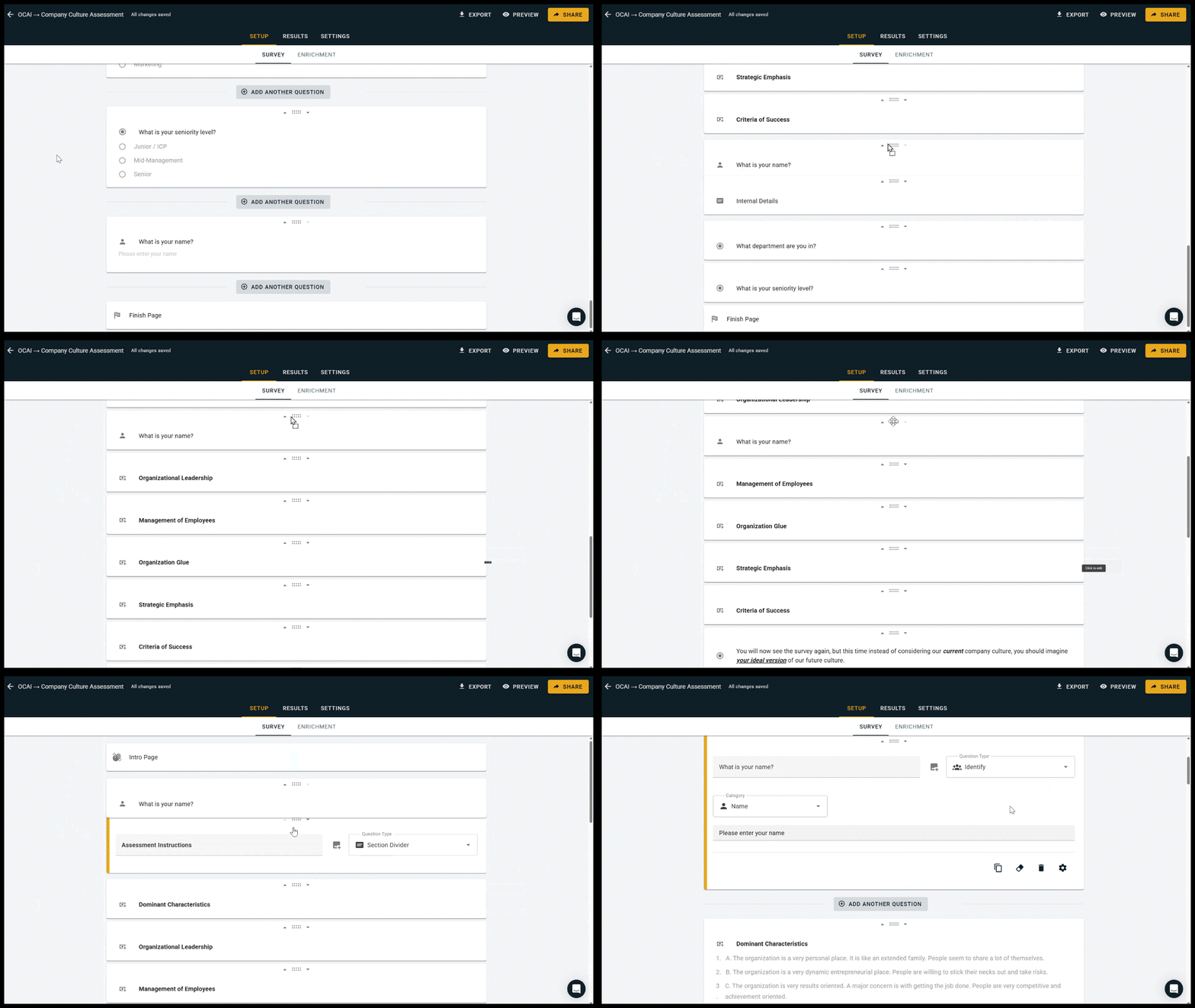
Reorder Mode
Once you start dragging a survey block on the setup tab, all other questions will collapse into a summary mode (just the block-type icon and question text) to allow for easier reordering. We also improved the auto-scroll functionality so that dragging a block to the top or bottom of the screen will scroll the page for you.
Add Another Question
The old + Add Block button was annoying. It only added new question blocks below the one you were currently editing, and it was often nowhere to be found when you needed it most (sometimes even tricking people into thinking OpinionX only allowed one-question surveys). We’ve replaced it with a much clearer set of ‘Add Another Question’ buttons throughout the survey setup page. While they take up a little extra space, I’ve already found these saving me a bunch of unnecessary clicks.

Identify Blocks
Speaking of features new users often missed, the Identify block was probably our single biggest source of customer support messages. Instead of grouping everything together under one block name, we’ve split them out into separate question types like Email Address, Participant Name, and Phone Number. You may also notice a fresh coat of paint on this menu too, we figured we may as well spruce it up while we were adding these :)
— — —
Upcoming Tier Changes
Later this month (September 2025), two existing features will move from the Analyze tier to the Accelerate tier:
1. Editor Seats → Surveys on the Analyze plan will now include 1 editor seat (the survey creator). You can still add unlimited view-only collaborators through Viewer invites or Guest Links, and workspaces will continue to have unlimited survey creators across all of our pricing plans.
2. Whitelabeling → The ability to hide the ‘Powered by OpinionX’ button will now join our other Accelerate tier branding features like custom survey URLs and styling.
We know it’s never fun to see features move up a tier; if anything we tend to do the opposite and give more away for free! The reason we’re making this change is to better align plans with how our customers use them: Analyze by individual researchers and Accelerate by more established product teams that need collaboration and brand alignment.
Over the past three years, we’ve lowered the price of Analyze from $480/year to $300/year while expanding the product from a simple tool for ranking pools into an advanced survey platform for strategic research. We can only continue to grow OpinionX if we align the value we offer with the tiering of features across our various plans.
We hate to disappoint you guys, so I hope you can understand our reasoning for this. I’m more than happy to receive any and all feedback you have on this topic.
— — —
Security Improvements
We’ve added a range of new functionality, protections, and changes to how OpinionX manages account security:
You’ll now receive email notifications for new logins from unrecognised locations.
Account Settings has an “Active Sessions” section that shows you a list of devices you’re currently logged in on and allows you to terminate those sessions.
Strengthened file upload protections to prevent malicious imports.
Added stricter rate limits to prevent login attempts or password resets after repeated failures.
Improved security for authentication tokens with stronger encryption, additional validation checks, and a shorter token lifetime.
Added server-side sign-out to allow refresh tokens to be revoked.
Removed client-side dependency on Stripe by moving the integration fully server-side.
Increased security standards and restrictions for new user passwords.
— — —
SAML SSO + QR Codes + Participant Overview Charts
SAML Single Sign-On (SSO)
Make your research workspace extra secure with SAML SSO. Teams on the Accelerate Tier now receive 10 SAML SSO seats to allocate amongst their researchers. Learn more about how to activate your SAML SSO seats. This new feature marks another expansion in our Accelerate Tier's enterprise security, whitelabeling, and priority support feature bundles.
-- -- --
QR Codes
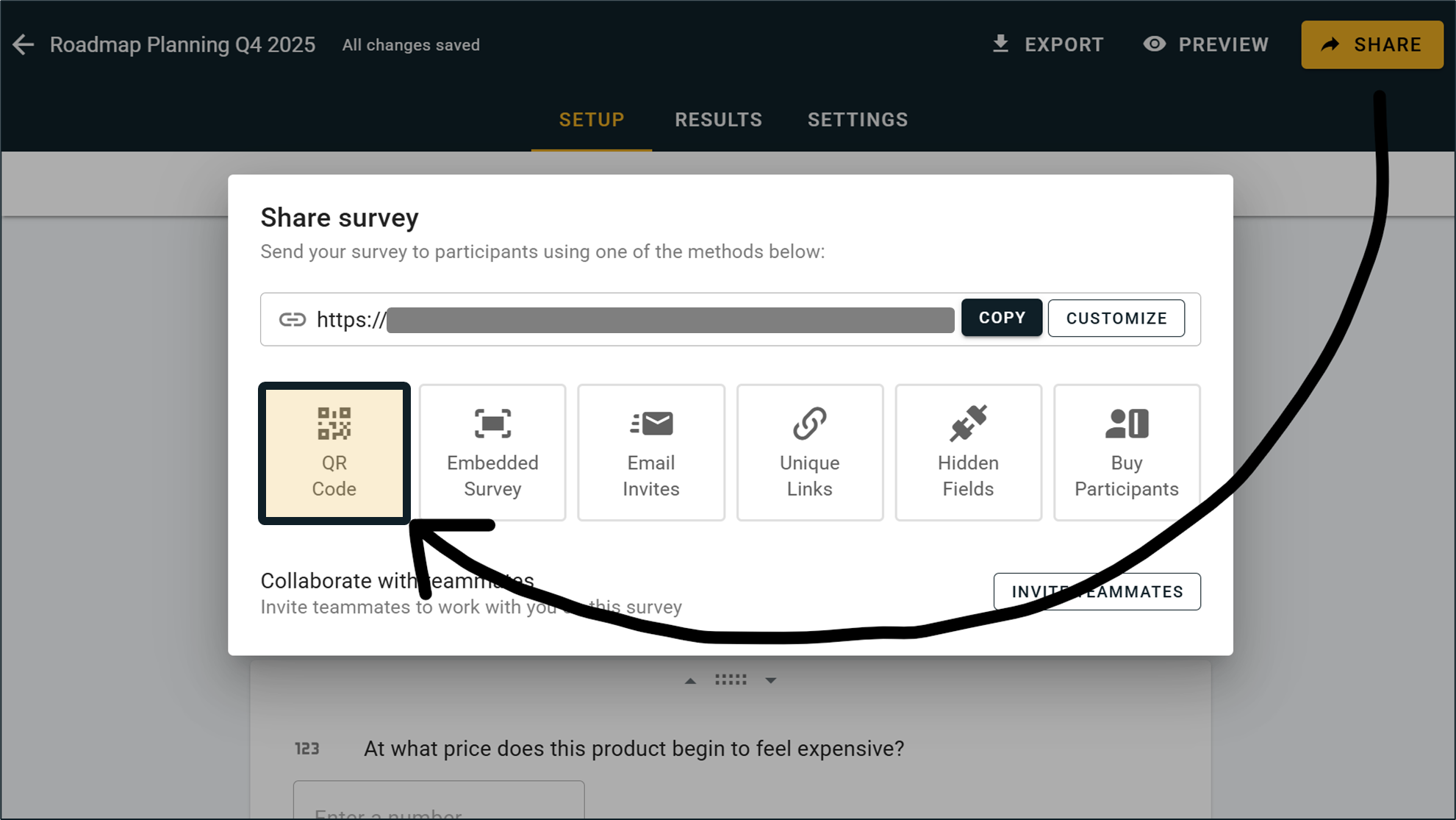
You can now distribute your survey to participants by QR Code. On the 'Share' menu, you'll see a new option for a personalized scannable image inside the QR Code option. This new distribution method is available for free to all users!
-- -- --
Participant Overview Charts
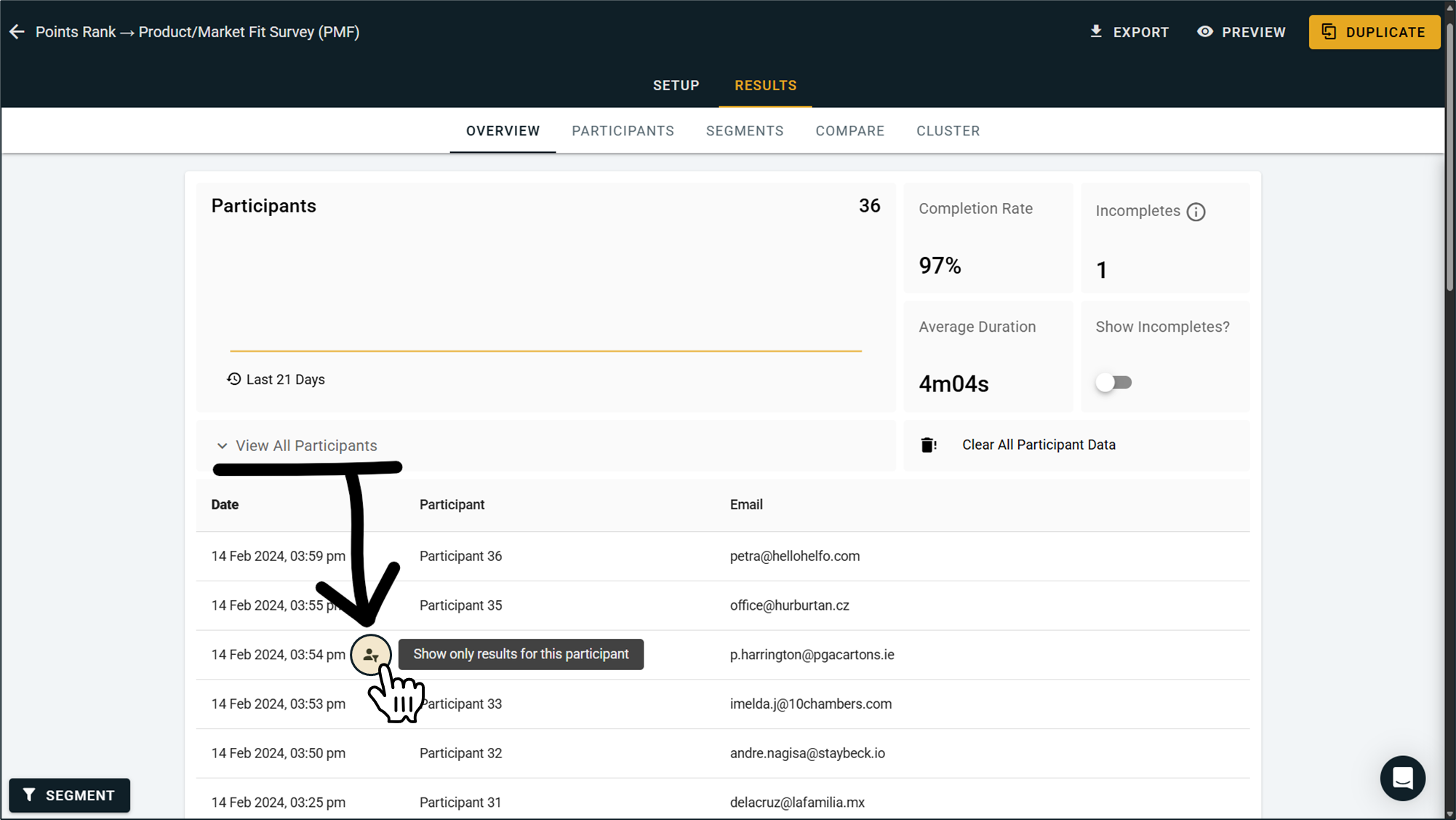
Once we added visual charts in last month's update, you guys were quick to ask for more ways to view specific types of data in the Overview Tab. We've added a new feature that let's you filter by individual participant. Open the 'View All Participants' dropdown table at the top of the Results Overview and hover over any participant's row to reveal a Participant Filter button. Clicking this will activate a filter for viewing this one participant's data in the overview page, including in any visual charts.
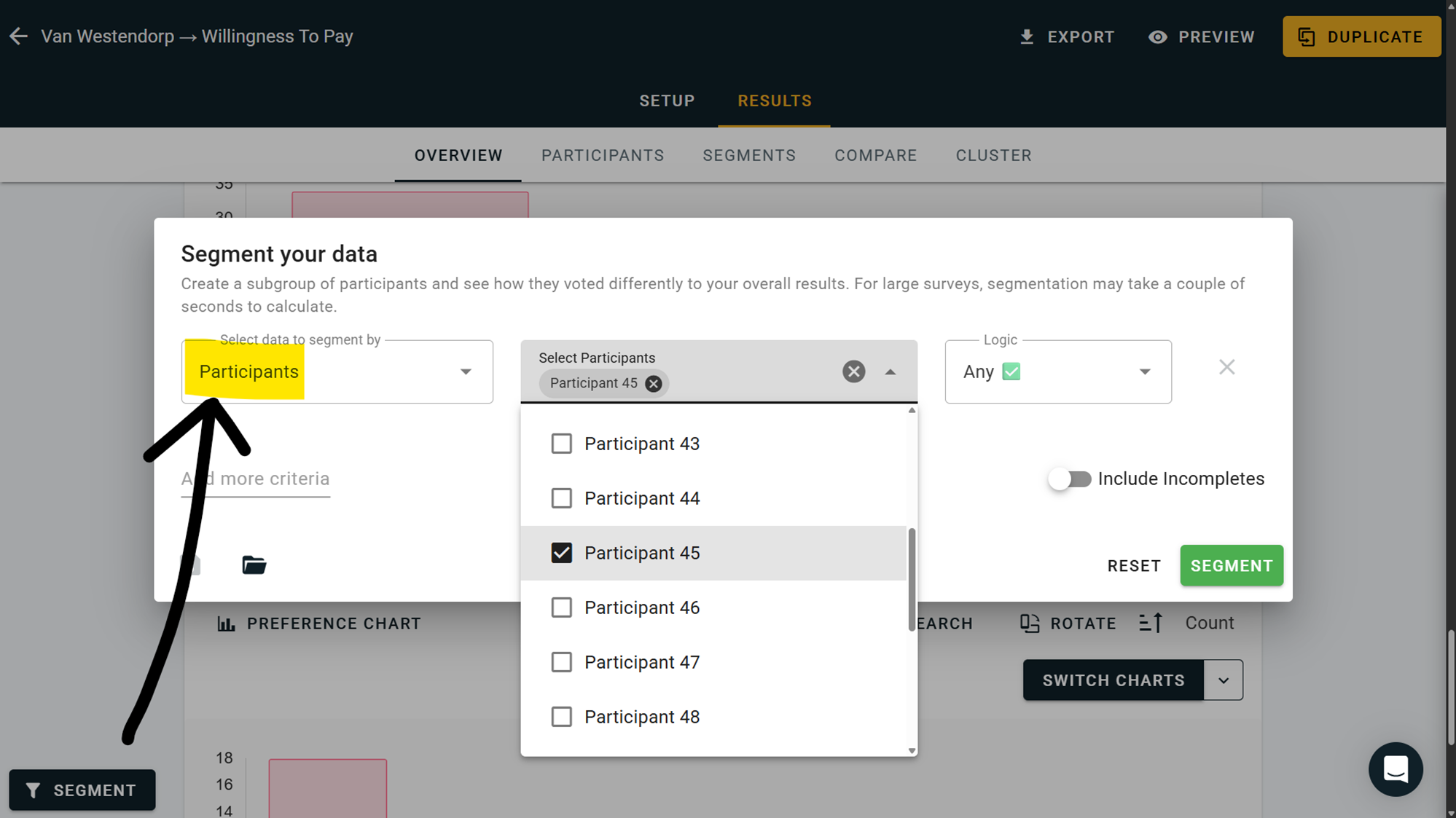
You'll also see a new method in the segmentation menu's dropdown list for different data types, where you can hand pick multiple participants manually by scrolling or searching for the specific participants you want to include:
This new feature is an expansion of our segmentation functionality, which is available on all paid plans. Users on the free tier can use this functionality on their first 10 participants, which is part of the preview mode they can use for all premium analysis features.
-- -- --
Learn more about unlocking SAML SSO for your team's research workspace →
New Charts & Analysis Views
We've added a range of new chart types to OpinionX and more sorting settings for these charts (by score or alphabetically). On the Results Overview page, hit the "Switch Charts" button in the top-right corner of each results block and you'll find new options like:
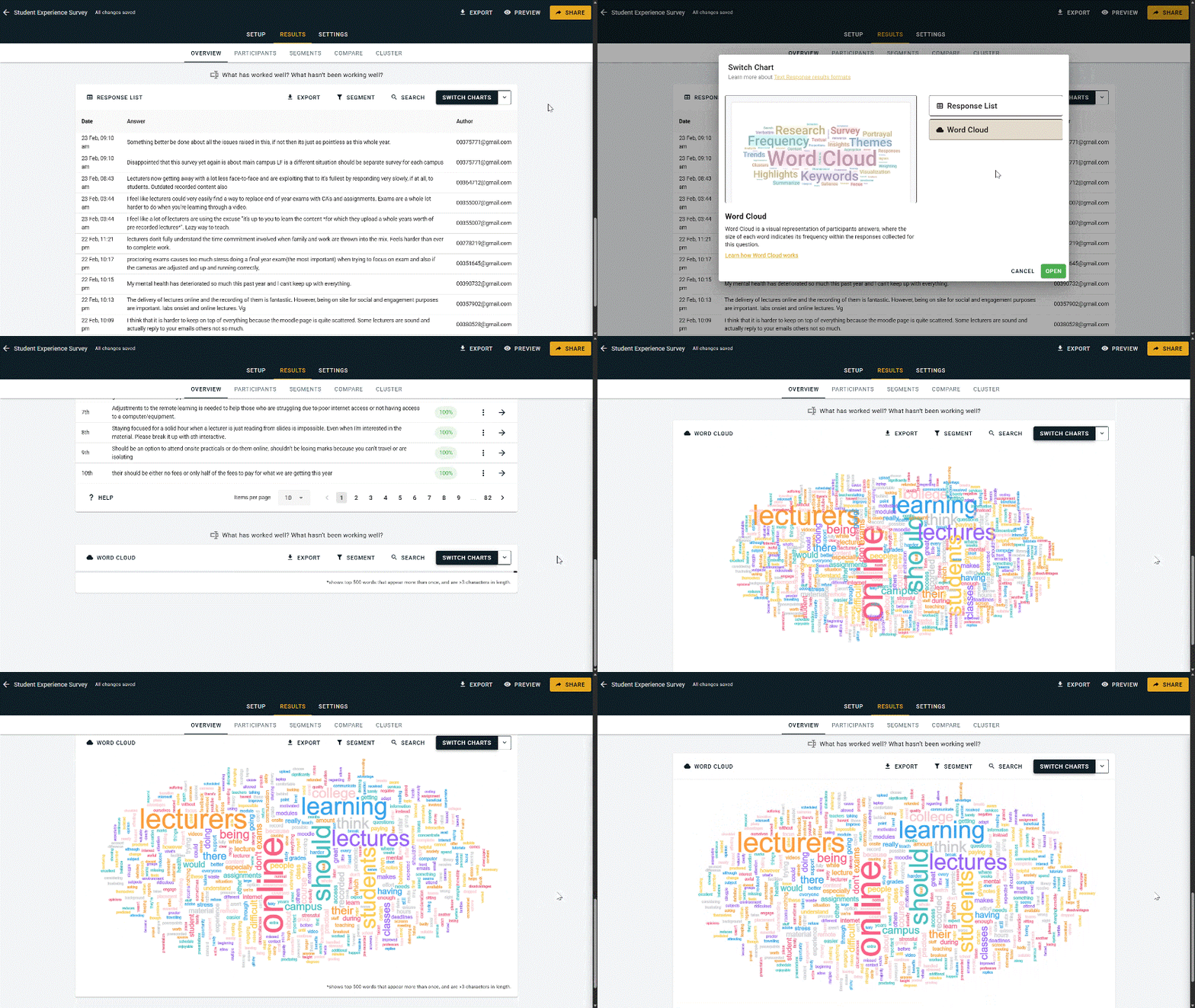
^ Word Cloud for analyzing keyword frequency on Text Response submissions
-- -- --
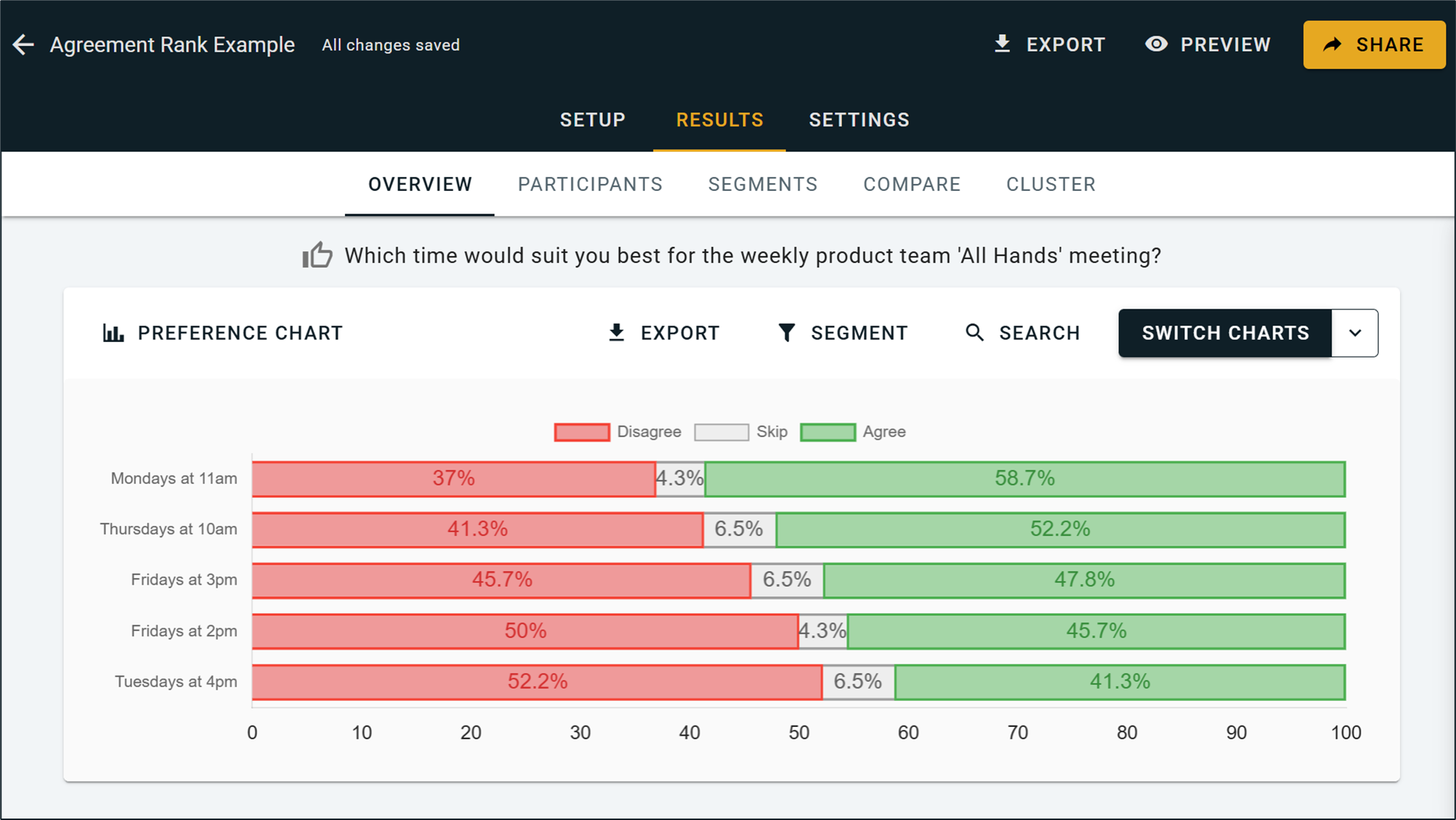
^ Stacked Bar Charts for Agreement Rank, showing the breakdown between Agree, Disagree, and Skip votes
-- -- --
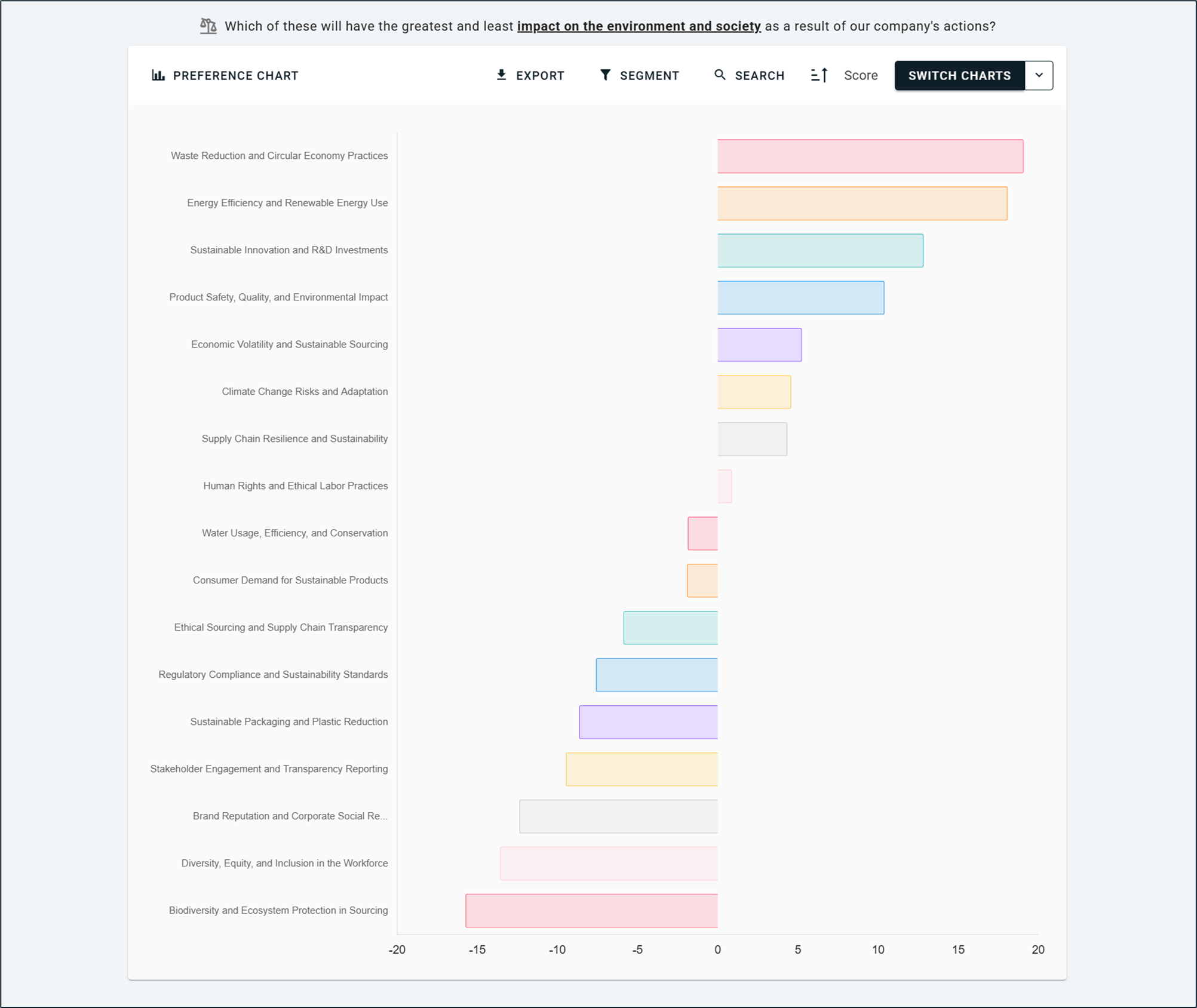
^ Preference Charts for MaxDiff Analysis, Pairwise Comparison, Ranked Choice Voting, and Points Allocation
-- -- --
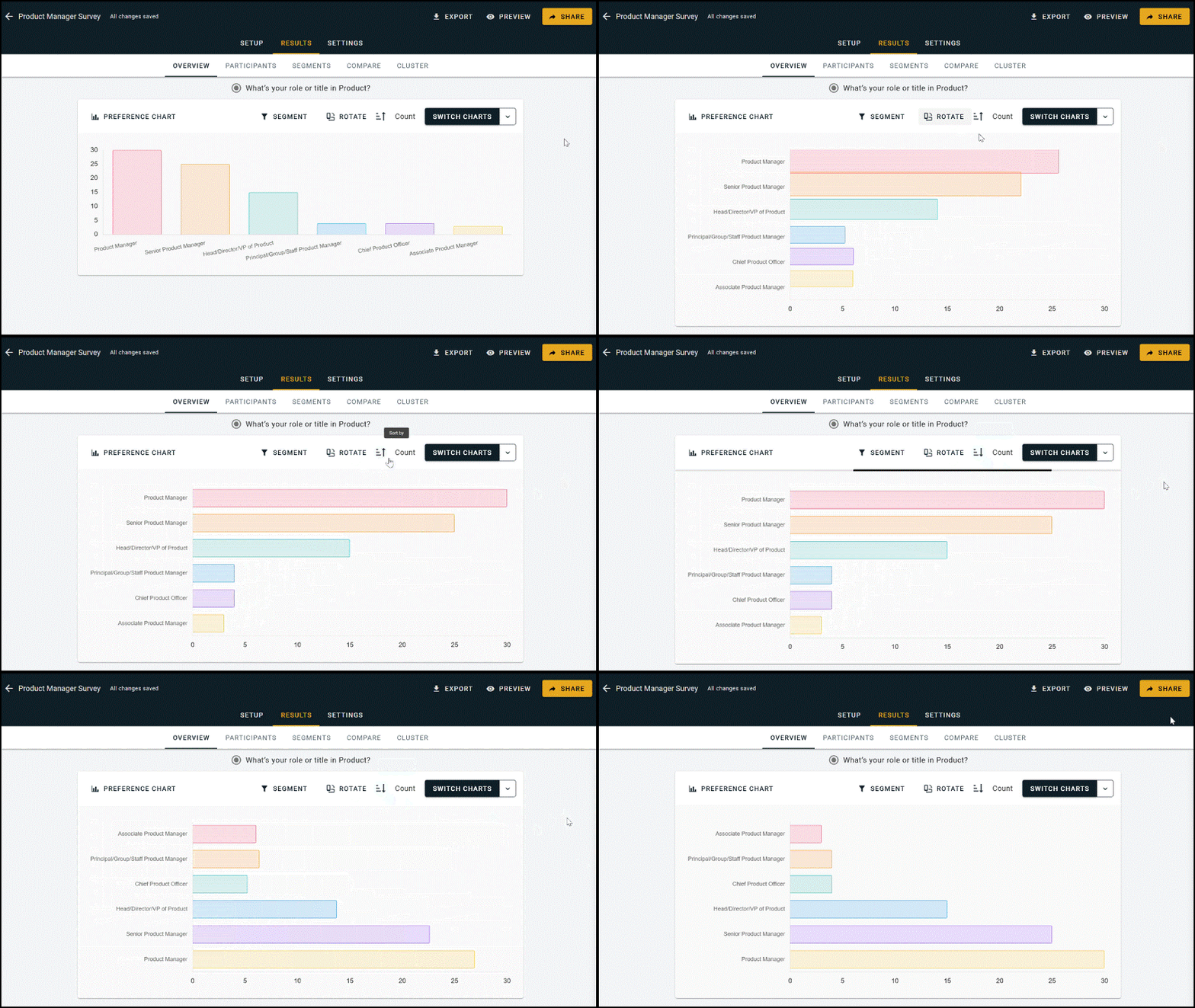
^ Switch between horizontal and vertical bar charts for Multiple Choice Questions → Multiple Choice blocks with >10 options will automatically appear as a vertical bar chart with pagination.
-- -- --
Other Updates & Improvements:
Fixed some issues with incorrect or missing translations for non-English language surveys.
Enrichment Data now correctly appears in the Participants file of Raw Data Exports.
Custom "other" answers written by participants and ranked in Order Rank or Points Rank questions now appear in Aggregated Results Exports with both their score and the custom text submission.
Custom Survey Colors & Themes
You can now change the color scheme for your OpinionX survey! You guys have been requesting this update since FOREVER so I'm really excited to finally get this into your hands :)
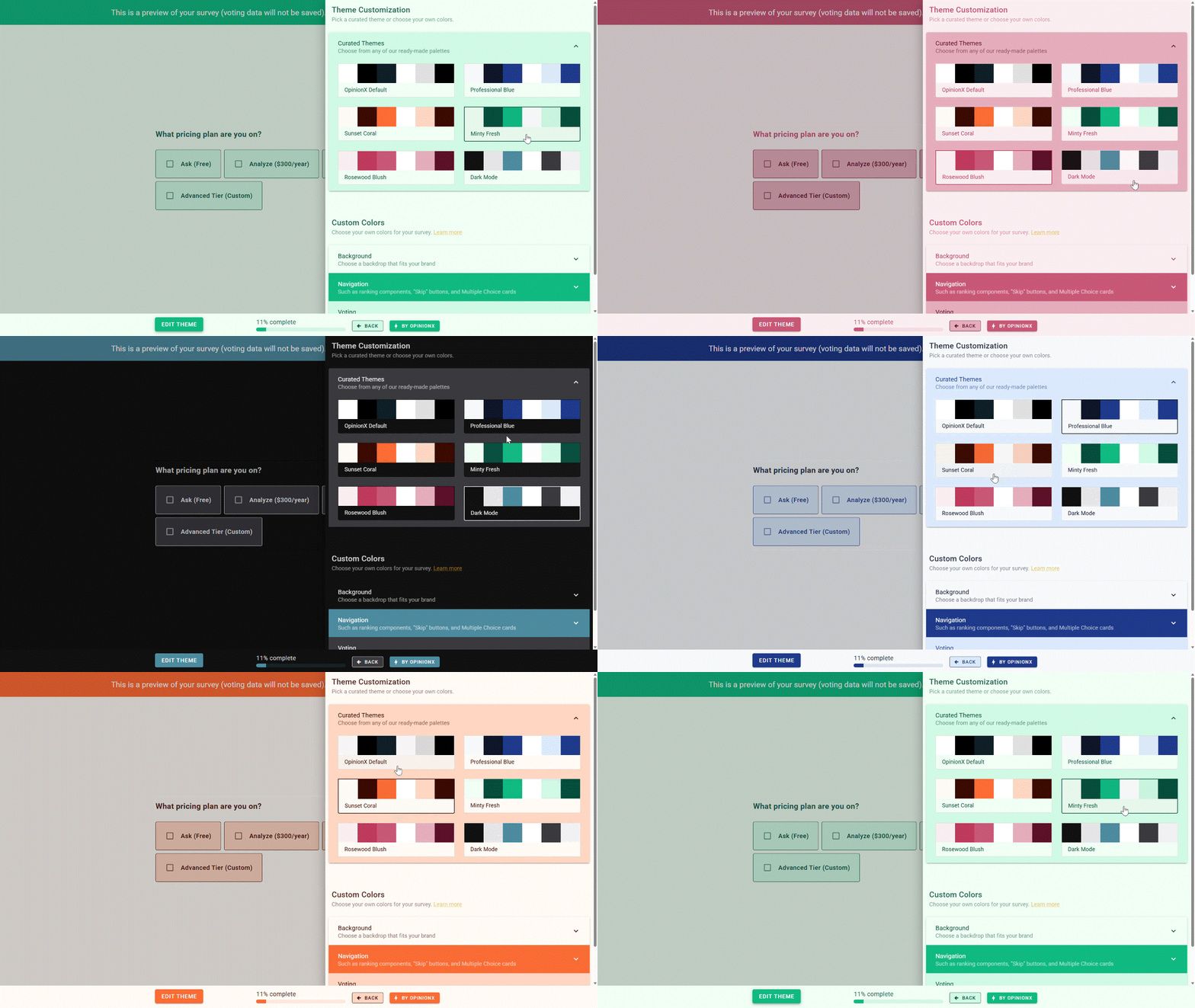
Choose from our curated themes (shown above) or define your own custom colors to exactly match your brand/style (shown below).
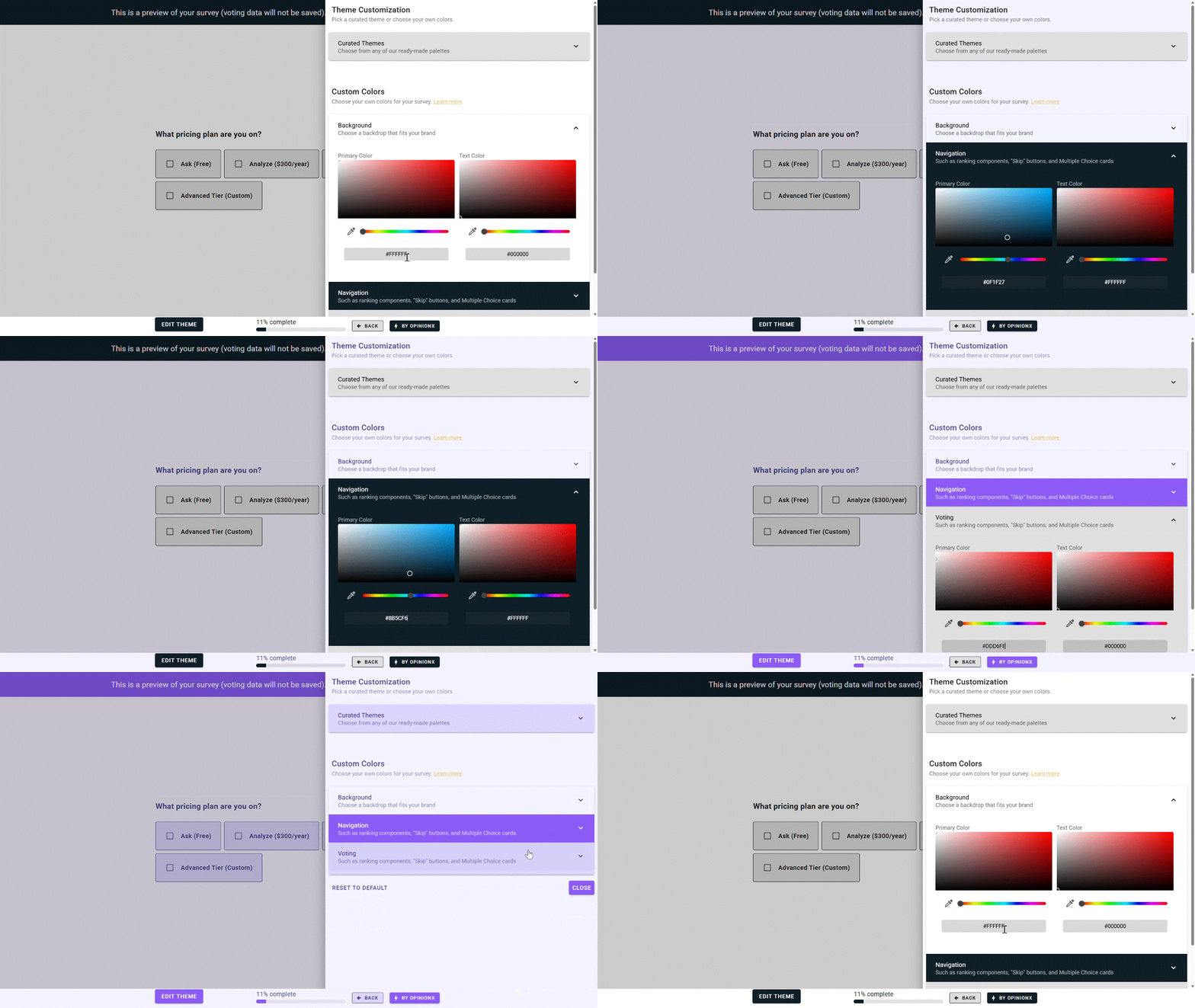
Curated Themes are available to all OpinionX users, while the Custom Colors feature is part of our Accelerate Tier's whitelabeling features bundle along with custom survey URLs and hiding OpinionX's branding.
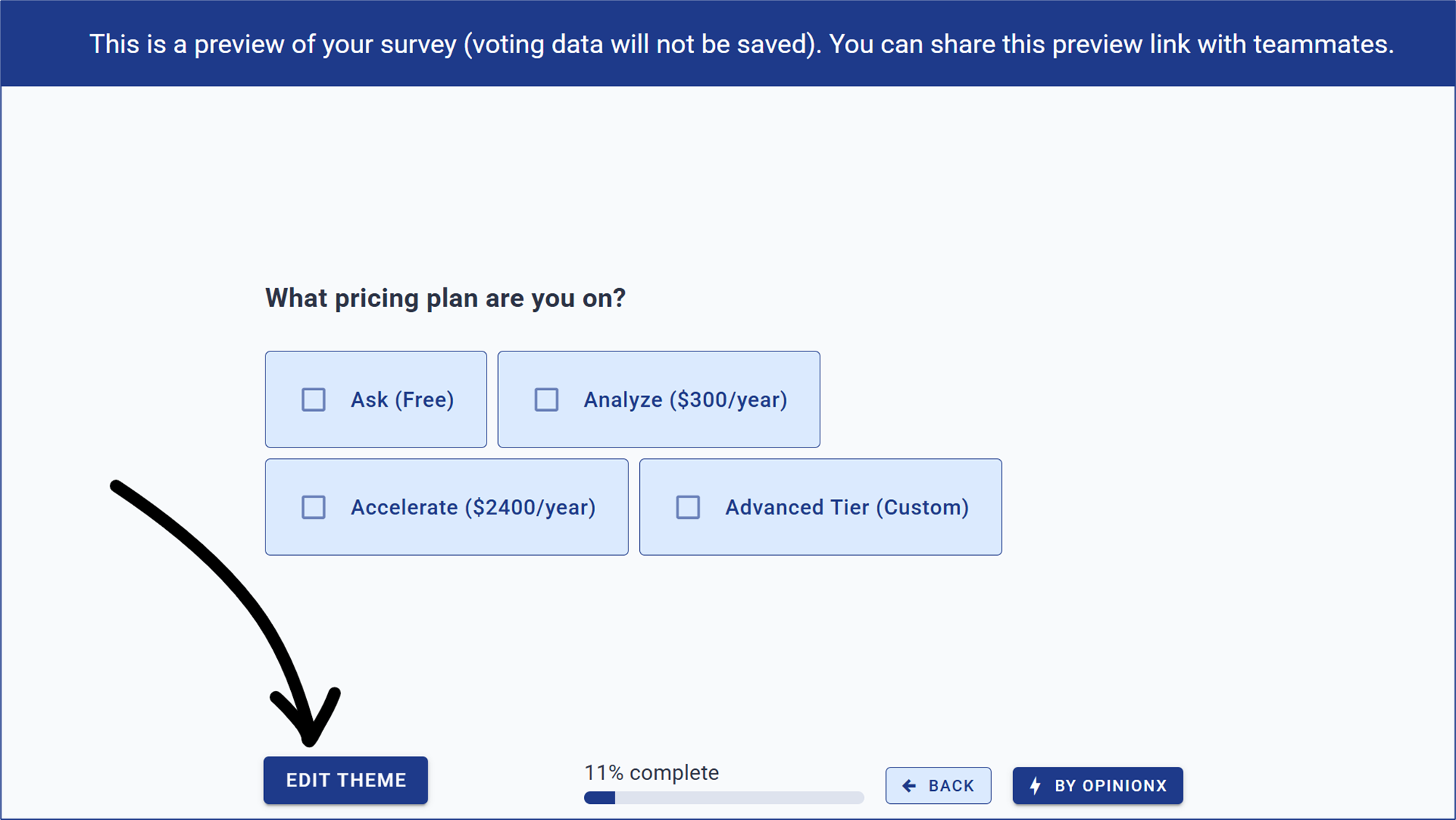
To find this new feature, hit the Preview button on your survey dashboard, continue past your survey's Welcome Page, and you'll see it an EDIT THEME button now on the survey footer bar:
-- -- --
Other Updates & Improvements
Changed the Expert Assistance credits allocated to each pricing tier so that we can better support customers with reviewing their survey setup or results analysis.
Refactored the Text Response question type, improving its overall efficiency, fixing a bug introduced by premium analysis previews, and changing the default version to single-response answers.
Multiple Choice questions now auto-reset cache when you make manual edits on the Participants Tab.
Fixed alignment issues that caused in-line images to appear with a different padding to survey text.
Numbered list formatting on question fields no longer causes hidden indentation.
Added the tooltip back to the Hidden Fields menu button to help explain what the feature does.
Added better formatting to the tooltips on the Conjoint Rank "Switch Chart" options.
Added a 1-second delay to the hover tooltip cards that appear on the Add New Block menu.
The word "Complete" now disappears from the survey on mobile screens to save on screen space.
Changed the survey roles from Can Edit / Can View to Editor / Viewer.
Improved the design of the MaxDiff question setup, putting the main customizations together.
Fixed an annoying typo on the Guest Link menu for sharing results access with non-OpinionX users.
Redesigned the Share Survey menu to showcase the range of ways you can distribute your survey.
Moved Custom Survey URL to the Accelerate tier as part of our whitelabeling feature set.
Learn more about customizing your OpinionX survey's color scheme →
Premium Trials for Everyone!
We constantly get messages and emails from free-tier users struggling to see how OpinionX's premium survey setup and analysis features work because they're locked away on inaccessible paid plans. It's time to change that...
-- -- --
All Survey Setup Options For Free!
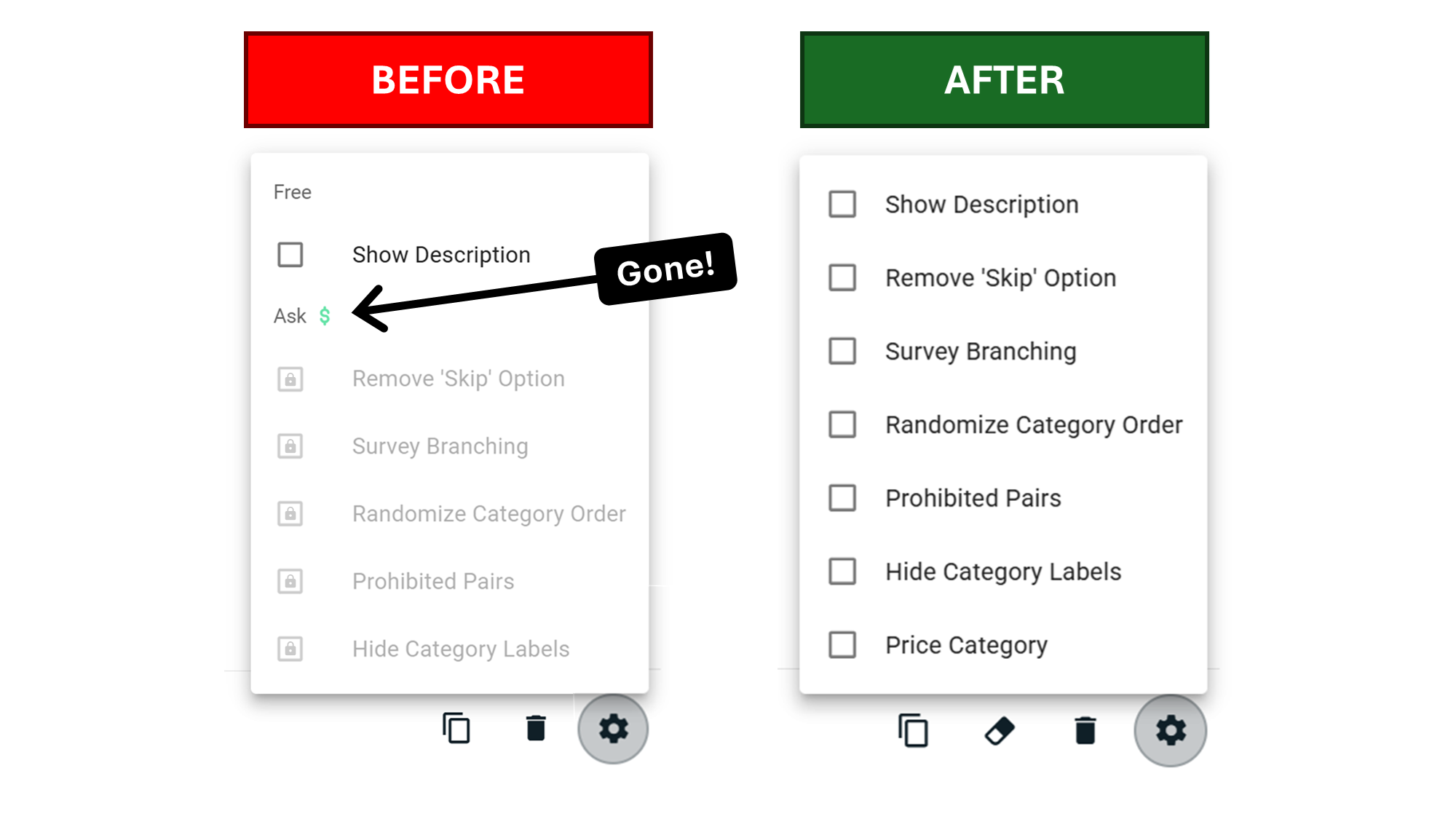
Starting today, all survey setup options are now available on the free tier, including branching logic, hidden fields links, and advanced conjoint setup.
-- -- --
Free Analysis Preview
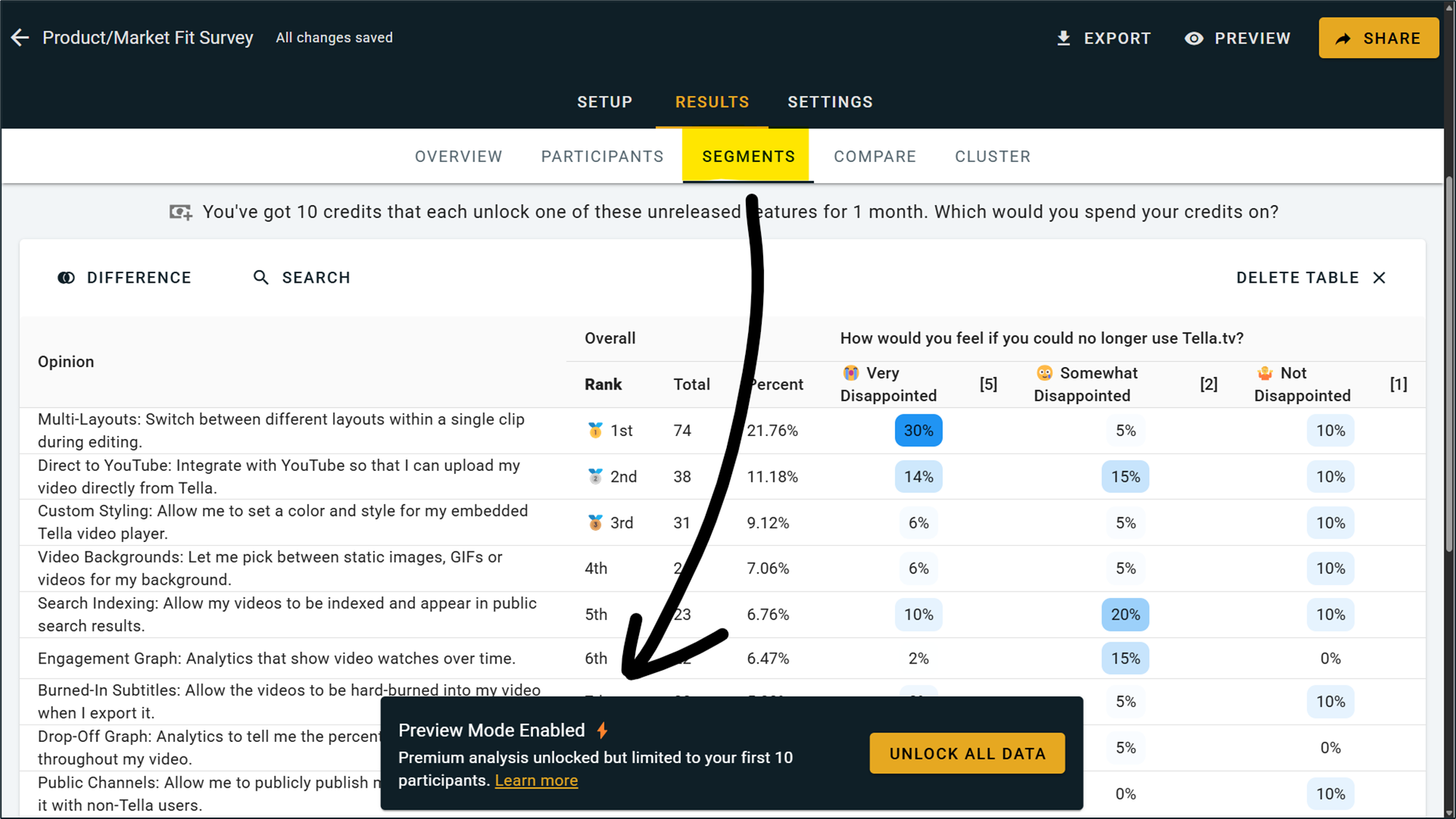
Additionally, we've unlocked the premium analysis features for every survey's first 10 participants, giving you a sneak peak of how OpinionX's functionality works with your own data. This means you can now test out features like exporting, segmentation filters and crosstabs, and participant-level results.
-- -- --
Other Changes
New results table with "other" write-ins for Points Rank and Order Rank blocks on the Overview Tab.
The Aggregate Results export for Points Rank now shows the actual points, not their percentages.
Simplified the segmentation menu on the Overview Tab, removing unnecessary buttons.